Item logo image for PageTidy

PageTidy

https://ansonalexander.com/
Item media 2 (screenshot) for PageTidy
Item video thumbnail
Item media 2 (screenshot) for PageTidy
Item video thumbnail
Item media 2 (screenshot) for PageTidy

Overview

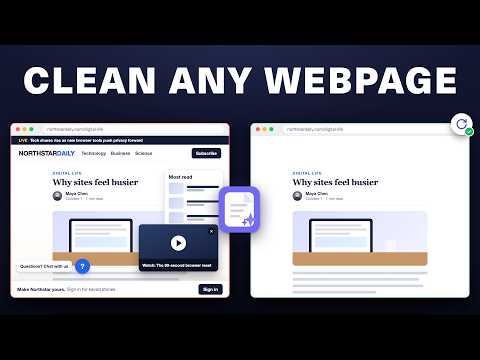
Remove annoying page clutter, restore broken scrolling, and remember the sites you want to keep clean.

PageTidy gives you a simple way to remove distracting elements from webpages and keep the sites you use clean. Click the PageTidy icon to remove a blocking overlay, repair a page that has stopped scrolling, or choose any element on the page to hide yourself. You can undo changes at any time, and PageTidy can remember your cleanups so they are applied automatically when you return. PageTidy is useful for removing things like newsletter popups, sticky headers, floating videos, chat widgets, sidebars, banners, app nags, and other page clutter you do not want on your screen. Key features: • Remove blocking overlays with one click • Restore scrolling when a popup or overlay leaves the page locked • Point and click to hide almost any page element • Undo, redo, or restore the page • Remember cleanups for websites you choose • Automatically reapply remembered cleanups • Local-first design with no ads or tracking • No access to every website required at installation Free users can use PageTidy’s manual cleaning tools and remember cleanups on up to 3 websites. PageTidy Pro is an optional paid upgrade that unlocks unlimited remembered websites. Early users can purchase PageTidy Founder Pro for a one-time payment of $9.99. Persistent cleanup requires permission only for the individual websites you choose to remember. PageTidy does not request permanent access to every website at installation. Some protected Chrome pages, including chrome:// pages and the Chrome Web Store itself, cannot be modified by extensions.

Details

  • Version
    1.0.1 launch
  • Updated
    October 3, 2026
  • Features
    Offers in-app purchases
  • Size
    35.18KiB
  • Languages
    English
  • Developer
    Website
    Email
    Anson@AnsonAlexander.com
  • Non-trader
    This developer has not identified itself as a trader. For consumers in the European Union, please note that consumer rights do not apply to contracts between you and this developer.

Privacy

Manage extensions and learn how they're being used in your organization

PageTidy has disclosed the following information regarding the collection and usage of your data. More detailed information can be found in the developer's privacy policy.

PageTidy handles the following:

Personally identifiable information
Financial and payment information
Authentication information
Web history
Website content

This developer declares that your data is

  • Not being sold to third parties, outside of the approved use cases
  • Not being used or transferred for purposes that are unrelated to the item's core functionality
  • Not being used or transferred to determine creditworthiness or for lending purposes

Support

Related

Duplicate Tabs Manager

0.0

Find and close duplicate tabs in Chrome. Choose what to keep, exclude websites and keep your browser organized.

TabEase — Smart Tab Manager

0.0

Clean stale and duplicate tabs safely, protect important sites, and restore anything.

FinishLater

5.0

Save unfinished webpages, clear your tabs, and return with a reminder.

Annoy Killer – Hide Distractions

5.0

Hide distracting page elements, banners and popups with a click. Save your choices for cleaner, focused browsing.

Scroll Position Saver

5.0

Automatically saves and restores your scroll position on every page you visit.

Ad Blocker

0.0

Declutter any page: hide ads, sponsored zones, and paint elements to remove. Local-first, lightweight.

ChambalFox Distraction Remover – Focus on What Matters

5.0

Hide ads, popups, sidebars and any distracting element in one click. Your clean layout is remembered for every site. 100% local.

EraseX

5.0

Remove distracting elements from any webpage with one click. Hover, click, gone — and CleanWeb remembers your choice.

ClearWeb - Free Ad Blocker & Popup Filter

0.0

Block ads, trackers, popups, and distracting page clutter with simple controls and optional Pro cleanup tools.

Eraser

0.0

Click to erase any element on a page. Removals are remembered per-site, with undo and restore.

Clear Site Data

5.0

A Chrome extension to clear cookies and local storage for the current site and reload the page.

Click to Remove Element — Persistent

0.0

Click to hide any page element. Removals persist across reloads. Local storage only — no account, no tracking.

Duplicate Tabs Manager

0.0

Find and close duplicate tabs in Chrome. Choose what to keep, exclude websites and keep your browser organized.

TabEase — Smart Tab Manager

0.0

Clean stale and duplicate tabs safely, protect important sites, and restore anything.

FinishLater

5.0

Save unfinished webpages, clear your tabs, and return with a reminder.

Annoy Killer – Hide Distractions

5.0

Hide distracting page elements, banners and popups with a click. Save your choices for cleaner, focused browsing.

Scroll Position Saver

5.0

Automatically saves and restores your scroll position on every page you visit.

Ad Blocker

0.0

Declutter any page: hide ads, sponsored zones, and paint elements to remove. Local-first, lightweight.

ChambalFox Distraction Remover – Focus on What Matters

5.0

Hide ads, popups, sidebars and any distracting element in one click. Your clean layout is remembered for every site. 100% local.

EraseX

5.0

Remove distracting elements from any webpage with one click. Hover, click, gone — and CleanWeb remembers your choice.

Search
Clear search
Close search
Google apps
Main menu