

PageSignal
1 rating
)
Overview
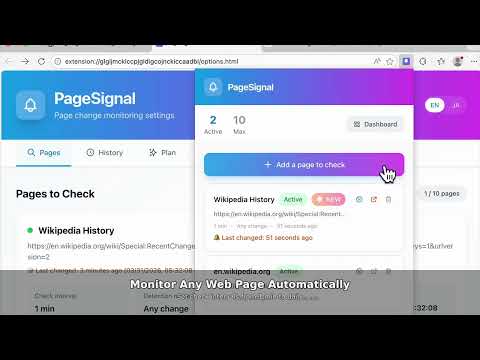
Check web pages for changes and get notified
PageSignal is a private website change monitor for Chrome. Track pages you care about — competitor sites, pricing pages, product pages, documentation, job postings, or any page you check repeatedly. PageSignal checks selected pages at configurable intervals and sends desktop notifications when changes are detected. Unlike server-based monitoring tools, PageSignal runs in your own browser. The pages you monitor and their content stay on your device. Use PageSignal to: • Monitor competitor websites and landing pages • Track pricing page changes • Watch product pages, docs, and release notes • Get notified when important pages change • Avoid manually checking the same pages again and again Free plan: monitor a small number of pages locally. Pro plan: higher-frequency checks and support for JavaScript-rendered pages.
5 out of 51 rating
Details
- Version1.0.0
- UpdatedMay 9, 2026
- FeaturesOffers in-app purchases
- Offered byOimos
- Size257KiB
- LanguagesEnglish (United States)
- Developer
Email
support@oimos.app - Non-traderThis developer has not identified itself as a trader. For consumers in the European Union, please note that consumer rights do not apply to contracts between you and this developer.
Privacy

PageSignal has disclosed the following information regarding the collection and usage of your data. More detailed information can be found in the developer's privacy policy.
PageSignal handles the following:
This developer declares that your data is
- Not being sold to third parties, outside of the approved use cases
- Not being used or transferred for purposes that are unrelated to the item's core functionality
- Not being used or transferred to determine creditworthiness or for lending purposes
Support
For help with questions, suggestions, or problems, visit the developer's support site