


Overview
Free SEO analysis with keyword density tracking, meta tag validation, and content insights for any webpage
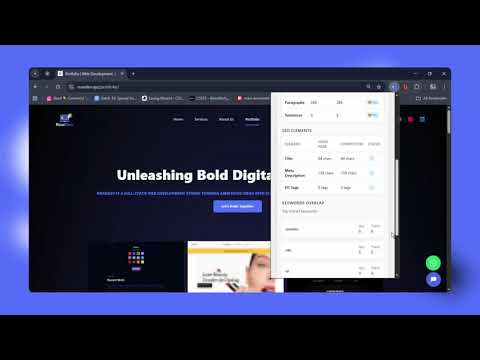
PageSEO Inspector is a powerful and easy-to-use SEO analysis browser extension built for SEO professionals, digital marketers, content writers, bloggers, and website owners who want fast, accurate on-page SEO insights directly in their browser. With one click, PageSEO Inspector analyzes any webpage and provides a complete SEO content audit to help you identify issues, optimize pages, and improve search engine rankings — no login required. CORE FEATURES On-Page SEO Analysis PageSEO Inspector checks essential on-page SEO elements based on modern search engine best practices: • Title tag length analysis (optimal 50–60 characters) • Meta description length analysis (optimal 150–160 characters) • Heading structure audit (H1–H6) • Detection of missing or multiple H1 tags • Visual SEO issue indicators (good, warning, critical) Content Analysis & Metrics Understand your content quality instantly: • Word count • Character count (with and without spaces) • Paragraph count • Sentence count Keyword Analysis & Tracking Optimize keyword usage without over-optimization: • Top 10 keywords with density percentages • Automatic stop-word filtering • Custom keyword density checker • Keyword placement detection in: – Title tag – Meta description – H1 and H2–H6 headings – First paragraph Website & Multi-Page SEO Crawler Analyze full websites, not just single pages: • Crawl up to 50 pages per site • Detect SEO issues across multiple URLs • Real-time crawl progress tracking • Site-wide SEO summary • Export reports as CSV files Competitor SEO Comparison Compare your page with competitors: • Content length comparison • SEO element comparison (title, meta description, headings) • Keyword overlap analysis • Actionable SEO improvement suggestions WHY USE PAGESEO INSPECTOR • 100% free Chrome SEO extension • No account or login required • Fast, lightweight, and accurate • Beginner-friendly with professional-level insights • Ideal for SEO audits, content optimization, and competitor research BEST USE CASES • On-page SEO audits • Blog content optimization • Keyword density checking • Competitor SEO research • Website SEO health checks FEEDBACK & SUPPORT • Send bug reports and feature requests • Share improvement suggestions • Optional “Buy us a coffee” support option Built with love by RoarDev Free for personal and commercial use.
5 out of 52 ratings
Details
- Version1.0.0
- UpdatedDecember 21, 2025
- Size35.98KiB
- LanguagesEnglish
- DeveloperMohammad Ibrahim KhalilWebsite
Kadhurkhil, Boalkhali Chittagong 4368 BDEmail
roardev24@gmail.comPhone
+880 1863-929202 - TraderThis developer has identified itself as a trader per the definition from the European Union and committed to only offer products or services that comply with EU laws.
Privacy

PageSEO Inspector has disclosed the following information regarding the collection and usage of your data. More detailed information can be found in the developer's privacy policy.
PageSEO Inspector handles the following:
This developer declares that your data is
- Not being sold to third parties, outside of the approved use cases
- Not being used or transferred for purposes that are unrelated to the item's core functionality
- Not being used or transferred to determine creditworthiness or for lending purposes
Support
For help with questions, suggestions, or problems, visit the developer's support site