

PageSaver - Webpage to PDF or Image or Markdown

Overview
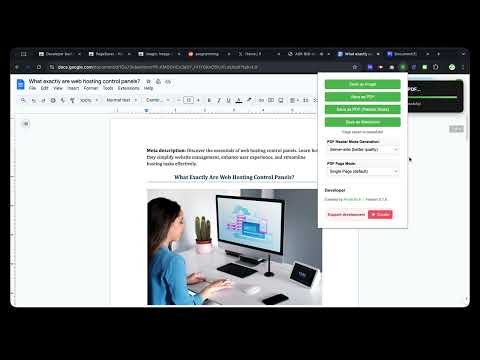
Capture full-page screenshots and save webpages as PDF or image, with reader mode.
Transform how you capture, save, and process web content with PageSaver - your all-in-one browser productivity tool. PageSaver is the ultimate browser extension for capturing, converting, and managing web content. Whether you need to save an entire webpage as PDF, capture full-page screenshots including content beyond the viewport, PageSaver has you covered. PERFECT FOR: * Saving webpage(including long webpage) as PDF or Image • Saving long ChatGPT conversations and thread discussions • Creating clean, readable PDFs from cluttered web articles • Archiving important web content for offline access • Converting web pages to multiple formats for documentation KEY FEATURES 📸 ADVANCED SCREENSHOT & CAPTURE • Full Page Screenshot - Capture entire webpages, including content outside the viewport • Long Page Support - Perfect for capturing infinite scroll pages, ChatGPT conversations, and lengthy discussions • Flexible Capture Modes - Capture the visible area, draw to select a region, or pick a specific element on the page • Built-in Screenshot Editor - Annotate captures with pen, highlighter, shapes, arrows, text, blur, and pixelate tools; undo/redo support • Multiple Export Formats - Save screenshots as PNG, JPG, WebP, or PDF directly from the editor 📄 SAVE WEBPAGE AS PDF • One-Click PDF Export - Convert any webpage to PDF instantly • Reader Mode PDF - Generate clean, distraction-free PDFs from webpage with enhanced readability • HTML to PDF Converter - Transform web content into professional documents 📝 MARKDOWN EXPORT • Save as Markdown - Convert webpages to Markdown format for easy editing • Preserve Structure - Maintain heading hierarchy and formatting • Developer-Friendly - Perfect for documentation and note-taking 🔖 SAVE FOR LATER • Bookmark & Archive - Save webpages for later retrieval • Offline Access - Download saved pages as PDF anytime • Content Library - Build your personal web content collection COMMON USE CASES FOR RESEARCHERS & STUDENTS • Save research articles as clean PDFs • Archive academic resources for offline study • Convert web content to Markdown for notes FOR PROFESSIONALS • Capture complete client conversations (Slack, email threads, chat logs) • Create PDF reports from web dashboards • Archive important documentation FOR CONTENT CREATORS • Save inspiration and reference materials • Capture social media threads and discussions • Convert web tutorials to offline formats FOR EVERYONE • Screenshot full webpages without scrolling • Save recipes, articles, and guides as PDFs • Keep important information accessible offline WHY CHOOSE PAGESAVER? ✓ All-in-One Solution - Multiple tools in one extension ✓ Fast & Efficient - Capture and convert in seconds ✓ User-Friendly - Intuitive interface, no technical knowledge required ✓ Actively Maintained - Regular updates and improvements WHAT YOU CAN DO WITH PAGESAVER: ✓ Save webpage as PDF ✓ Save webpage as image ✓ Save webpage as Markdown ✓ Convert HTML to PDF ✓ Convert HTML to Image ✓ Full page screenshot capture ✓ Screenshot entire webpage (including scrollable content) ✓ Capture long ChatGPT conversations ✓ Capture visible area, selected region, or specific page element ✓ Edit and annotate screenshots with drawing, text, blur and more ✓ Export screenshots as PNG, JPG, WebP, or PDF ✓ Generate reader mode PDFs ✓ Save for later reading ✓ Offline webpage archive START SAVING SMARTER TODAY Install PageSaver now and revolutionize how you capture, save, and manage web content. Whether you're a student, professional, researcher, or casual user, PageSaver provides the tools you need to work more efficiently online. Download PageSaver and never lose important web content again! SUPPORT & FEEDBACK Questions? Suggestions? We'd love to hear from you! Your feedback helps us improve PageSaver for everyone. PageSaver - Capture. Convert. Save. All in one click.
4.4 out of 530 ratings
Details
- Version2.5.2
- UpdatedSeptember 18, 2026
- Size322KiB
- Languages9 languages
- DeveloperWebsite
Email
pikexxn@gmail.com - Non-traderThis developer has not identified itself as a trader. For consumers in the European Union, please note that consumer rights do not apply to contracts between you and this developer.
Privacy

PageSaver - Webpage to PDF or Image or Markdown has disclosed the following information regarding the collection and usage of your data. More detailed information can be found in the developer's privacy policy.
PageSaver - Webpage to PDF or Image or Markdown handles the following:
This developer declares that your data is
- Not being sold to third parties, outside of the approved use cases
- Not being used or transferred for purposes that are unrelated to the item's core functionality
- Not being used or transferred to determine creditworthiness or for lending purposes
Support
For help with questions, suggestions, or problems, visit the developer's support site