

Page to B-Roll
1 rating
)
Overview
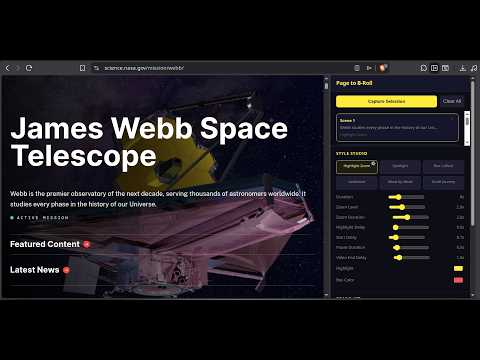
Capture any webpage as cinematic B-roll video. Select text, apply camera presets, export studio-grade MP4.
Page to B-Roll converts webpage text and highlights into video clips with camera pan and zoom animations. How to use it: 1. Open the extension side panel. 2. Select text on any webpage. 3. Choose a camera preset (such as a smooth zoom, spotlight, or underline highlight). 4. Configure values like zoom speed, highlight colors, and aspect ratios. 5. Export the animation directly to your device. Why install it: * Creates smooth video clips of articles, blog posts, or documentation. * Automates camera movements, zoom transitions, and text highlights, saving time in post-production. * Handles responsive layouts automatically with support for 16:9 (widescreen), 9:16 (vertical), and 1:1 (square) aspect ratios. * Cleans up the webpage by automatically hiding floating ads and sticky navigation bars during rendering. * Uses a frame-by-frame rendering engine that guarantees a smooth output video regardless of your hardware specs. Perfect for content creators, educators, and developers who need to showcase web content in their videos.
5 out of 51 rating
Details
- Version1.0.0
- UpdatedJuly 14, 2026
- Offered byHarshvdev
- Size52.33KiB
- LanguagesEnglish
- Developer
Email
contact.harshvdev@gmail.com - Non-traderThis developer has not identified itself as a trader. For consumers in the European Union, please note that consumer rights do not apply to contracts between you and this developer.
Privacy

This developer declares that your data is
- Not being sold to third parties, outside of the approved use cases
- Not being used or transferred for purposes that are unrelated to the item's core functionality
- Not being used or transferred to determine creditworthiness or for lending purposes