

Page Notes - Smart Annotations
1 rating
)
Overview
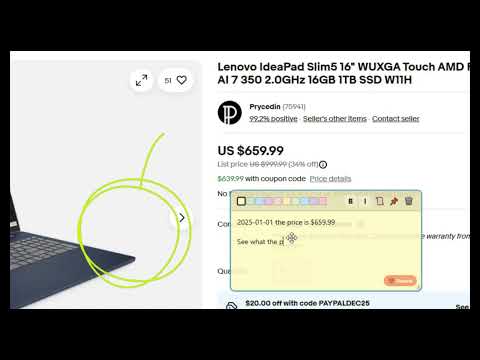
Create sticky notes on web pages. Colorful notes sync via Google Drive. Includes import/export for backup and trash system.
## 🚀 Basic Usage **Pin to Toolbar:** - Click "puzzle" icon 🧩 in Chrome top-right - Find Page Notes → click "pin" icon 📌 - Icon now always in toolbar **Create Note:** - Click extension icon → "New Sticky Note" - Type text - auto-saves - Drag to move, corner to resize **Manage Notes:** - Click header to move - Color dots for background - B/I for text formatting - 📌 Pin to page content - 🗑️ Delete notes ## 📊 Notes Manager **Access:** Extension icon → "All Notes" **Features:** - View all notes from all websites - Search by content/URLs - Edit/delete notes - Flat list or By websites view - Import/export backups ## ☁️ Google Drive Sync ⚠️ IMPORTANT: Google Drive sync works ONLY in Google Chrome browser. In other Chromium-based browsers (Yandex, Chromium, etc.) notes are stored only locally without cloud sync. **Setup:** 1. Notes Manager → "Login to Google" 2. Grant permissions 3. Auto-sync to your Drive **Benefits:** - Notes on all devices - Automatic backups - Manual "Sync Now" button - Works offline ## 💾 Backup **Automatic:** - Google Drive sync - Every 5 minutes + on changes - No manual action needed **Manual:** - Export: Notes Manager → Export → JSON file - Import: Notes Manager → Import → Select backup ## 🎨 Customization **Colors:** 10 options **Languages:** EN/RU/DE **Themes:** Light/Dark **Settings:** Notes Manager sidebar ## 🔧 Quick Fixes - Notes not showing? Refresh page - Sync issues? Re-login Google - Missing notes? Check backups - Extension gone? Re-pin from 🧩
5 out of 51 rating
Details
- Version1.4.7
- UpdatedFebruary 16, 2026
- Offered byAntonyGru
- Size107KiB
- LanguagesEnglish
- Developer
Email
a9100858684@gmail.com - Non-traderThis developer has not identified itself as a trader. For consumers in the European Union, please note that consumer rights do not apply to contracts between you and this developer.
Privacy

Page Notes - Smart Annotations has disclosed the following information regarding the collection and usage of your data. More detailed information can be found in the developer's privacy policy.
Page Notes - Smart Annotations handles the following:
This developer declares that your data is
- Not being sold to third parties, outside of the approved use cases
- Not being used or transferred for purposes that are unrelated to the item's core functionality
- Not being used or transferred to determine creditworthiness or for lending purposes