


Overview
Measure page load performance
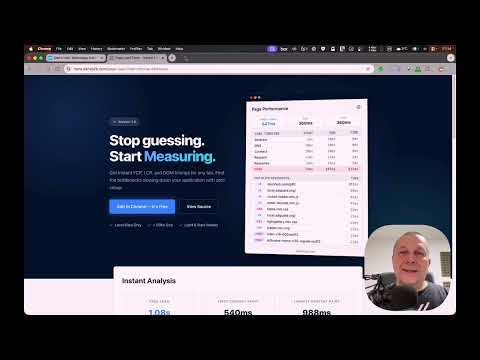
Instant page load performance at a glance - no DevTools required. Page Load Timer shows real performance data for any website you visit. Click the icon and see exactly how the page loaded: total time, Core Web Vitals, phase-by-phase timeline, and the slowest resources dragging it down. 👉 NEW IN 1.1.1 - CLS (layout shift) joins the metrics, so you see how much the page jumps while it loads - Third-party resources are marked in a new 3P column. Click the 3P header to show only those - A summary line under the resources: how many resources the page requested, and how many are third-party - The resources table scrolls inside the popup and lists up to 20 resources. Long names keep their ending, so you still see the file type - Every metric shows its unit in the label. A tooltip on each card explains the metric and how it is rated - Better contrast in the light theme, and the version in Settings - One compact layout: the density setting is gone 👉 WHAT YOU GET Six key metrics - Page Load, FCP, LCP, TTFB, DOMContentLoaded and CLS, front and center, each colored by how good it is. Load Timeline - see where time is spent: Redirect, DNS, Connect, Request, Response, DOM processing. The slowest phase is highlighted so you spot the bottleneck immediately. Slowest Resources - the slowest assets on the page (up to 20), sorted by load time, with their size. Each one is tagged by type (JS, CSS, IMG, XHR, FONT) so you know what to optimize first. Third-party resources get a dot in the 3P column. Resources over 500 ms are flagged in red. Badge on Icon - the extension icon shows the load time in seconds, color-coded: green (under 1s), orange (under 3s), red (over 3s). You can see page speed without even opening the popup. 👉 WHO IT'S FOR - Web developers checking performance without opening DevTools - QA engineers verifying page speed during testing - SEO specialists auditing Core Web Vitals across pages - Anyone curious about how fast (or slow) websites really are 👉 CUSTOMIZABLE - Theme: Auto (follows your OS), Light, or Dark - Toggle sections on/off: hide the timeline, the resources table or the summary line - Badge on/off: disable the icon badge if you prefer a clean toolbar - Ignored domains: one per line, subdomains included - nothing is measured there and no badge is shown - All settings are saved and persist across sessions 👉 LIGHTWEIGHT AND PRIVATE - About 30 KB. No frameworks, no dependencies, no build step. - Manifest V3. Runs as a service worker - no persistent background page. - All data stays local in your browser. Nothing is sent anywhere, ever. - No analytics, no tracking. The extension makes no network requests of its own. - Minimal permissions: only activeTab, storage and scripting. - Open source: https://github.com/denisrasulev/page-load-timer 👉 HOW IT WORKS When a page loads, the extension captures navigation timing and Web Vitals (FCP, LCP and CLS via PerformanceObserver). It groups and ranks resources by load time. Open the popup to see everything. For tabs that were already open, it collects data on demand - just click the icon. 👉 ABOUT THE LINK BAR The popup shows one short text link at the bottom. Some of these are affiliate links to services I use; if you sign up through one, I may earn a commission at no cost to you. Nothing is loaded from the internet and nothing happens unless you click.
0 out of 5No ratings
Details
- Version1.1.1
- UpdatedOctober 23, 2026
- Offered byDen's Hub
- Size34.21KiB
- LanguagesEnglish
- DeveloperDenis Rasulev
Lenardova 12 Bratislava 851 01 SKEmail
support@denshub.comPhone
+421 919 285 312 - TraderThis developer has identified itself as a trader per the definition from the European Union and committed to only offer products or services that comply with EU laws.
Privacy

This developer declares that your data is
- Not being sold to third parties, outside of the approved use cases
- Not being used or transferred for purposes that are unrelated to the item's core functionality
- Not being used or transferred to determine creditworthiness or for lending purposes
Support
For help with questions, suggestions, or problems, please open this page on your desktop browser