

Page Invite Manager — Facebook Page Invitations
1 rating
)
Overview
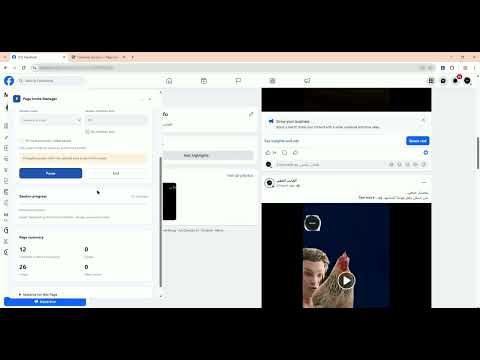
Invite people who reacted to your Facebook Page posts and reels. Review results, set limits, and save your progress.
Invite people who reacted to your Facebook Page posts and reels, with session limits and a saved invitation history. Page Invite Manager by tekunoma helps Facebook Page managers work through available reaction lists and send Page invitations using the Invite buttons that Facebook makes available. It processes people in displayed order and records the results shown by Facebook. WHAT YOU CAN DO • Review reactions across Page posts and reels, including the All reactions tab when available. • Choose review only or review and send invitations. • Set post and invitation limits, with additional options depending on your plan. • Pause, resume or stop a session, and minimize the floating workspace. • Keep language, settings and local progress between visits. • Skip previous invitations and people already following. A repeat invitation requires your explicit setting and an active Facebook Invite button. • Use the interface in 19 languages, with matching supported Facebook interface languages. GET STARTED Open a Facebook Page you manage, scroll to a visible post and click the extension icon. Open Account to create a tekunoma account, select an available free trial or paid plan. Browser linking completes automatically when possible, with a manual link option if needed. Choose your session settings, review them and press Start. Installing or opening the extension does not start invitations by itself. START FOR FREE Create a free tekunoma account and try Page Invite Manager with a limited free trial. An account and connection to our service are required. Optional paid upgrades provide additional capacity and features. YOUR DATA Facebook reaction identities and the invitation deduplication history are processed locally in your browser. The service processes account/device/subscription information, pseudonymous Page references and invitation usage to enforce your plan. Optional diagnostics require separate consent and an explicit report submission. IMPORTANT The extension only uses invitation controls available to your Facebook account on supported Pages. It does not send Facebook messages or grant extra platform permissions. Facebook interface changes and restrictions can affect availability. It does not guarantee new followers, audience growth, uninterrupted background operation or bypass of Facebook limits. Page Invite Manager is an independent product by tekunoma, not affiliated with or endorsed by Meta or Facebook. Website: https://invite.tekunoma.com/ Privacy: https://invite.tekunoma.com/privacy.html Support: support@tekunoma.com
5 out of 51 rating
Details
- Version0.124.0
- UpdatedNovember 5, 2026
- FeaturesOffers in-app purchases
- Offered byTekunoma
- Size253KiB
- Languages19 languages
- Developer
Email
tekunomaceo@gmail.com - Non-traderThis developer has not identified itself as a trader. For consumers in the European Union, please note that consumer rights do not apply to contracts between you and this developer.
Privacy

Page Invite Manager — Facebook Page Invitations has disclosed the following information regarding the collection and usage of your data. More detailed information can be found in the developer's privacy policy.
Page Invite Manager — Facebook Page Invitations handles the following:
This developer declares that your data is
- Not being sold to third parties, outside of the approved use cases
- Not being used or transferred for purposes that are unrelated to the item's core functionality
- Not being used or transferred to determine creditworthiness or for lending purposes
Support
For help with questions, suggestions, or problems, visit the developer's support site