


概述
Make any webpage into a content editable document and modify it via toolbar popup!
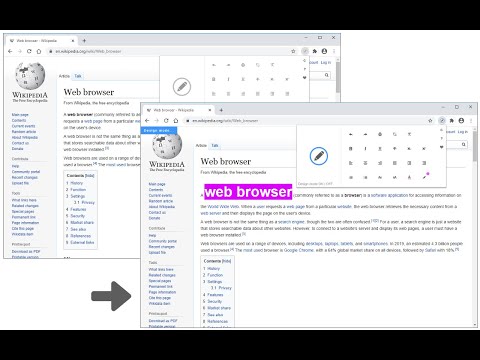
Page Edit is an extension that let you make changes to any HTML webpage. To work with this add-on, simply open the toolbar popup UI and then click on the big toggle button on the left side. Once the add-on is active, the icon turns to blue color. A - Design Mode - banner will also be shown in the current tab at the top left corner. Now, the document is ready for editing; make desired changes with the text editing buttons available in the toolbar popup UI. Once your edits are completed, click on the toggle button again to turn off the add-on. Note: to work with text editing tools in the toolbar popup UI, please first select a text and then click on the desired button in the popup. If you found a bug to report, or have a feature request in mind, please fill out the bug report form on the add-on's homepage (https://mybrowseraddon.com/page-edit.html).
4.6 星(5 星制)35 个评分
详情
- 版本0.1.9
- 上次更新日期2025年12月11日
- 提供方Keller
- 大小240KiB
- 语言English
- 开发者
邮箱
hovie.keller@gmail.com - 非交易者该开发者尚未将自己标识为交易者。欧盟地区消费者须知:消费者权利可能不适用于您与该开发者达成的合约。
隐私权

该开发者已声明,您的数据:
- 不会因未获批准的用途出售给第三方
- 不会为实现与产品核心功能无关的目的而使用或转移
- 不会为确定信用度或放贷目的而使用或转移
支持
若有任何疑问、建议或问题,请访问开发者的支持网站