


סקירה כללית
Make any webpage into a content editable document and modify it via toolbar popup!
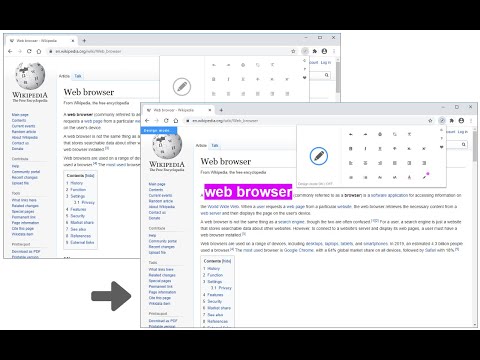
Page Edit is an extension that let you make changes to any HTML webpage. To work with this add-on, simply open the toolbar popup UI and then click on the big toggle button on the left side. Once the add-on is active, the icon turns to blue color. A - Design Mode - banner will also be shown in the current tab at the top left corner. Now, the document is ready for editing; make desired changes with the text editing buttons available in the toolbar popup UI. Once your edits are completed, click on the toggle button again to turn off the add-on. Note: to work with text editing tools in the toolbar popup UI, please first select a text and then click on the desired button in the popup. If you found a bug to report, or have a feature request in mind, please fill out the bug report form on the add-on's homepage (https://mybrowseraddon.com/page-edit.html).
4.6 מתוך 535 דירוגים
פרטים
- גרסה0.1.9
- עדכון אחרון11 בדצמבר 2025
- מאתKeller
- גודל240KiB
- שפותEnglish
- מפתח
אימייל
hovie.keller@gmail.com - לא עסקהמפַתח הזה לא ציין שהפעילות שלו נעשית במסגרת עסק. חשוב לשים לב: זכויות הצרכן לא חלות על חוזים בין צרכנים שנמצאים באיחוד האירופי לבין המפַתח הזה.
פרטיות

המפַתח הזה מצהיר כי הנתונים שלך:
- לא יימכרו לצדדים שלישיים, למעט בתרחישים שאושרו
- לא משמשים או מועברים למטרות שאינן קשורות לפונקציונליות המרכזית של הפריט
- לא משמשים או מועברים לצורך קביעת מצב אשראי או לצורכי הלוואה
תמיכה
באתר התמיכה של המפתח ניתן לקבל עזרה לגבי שאלות, הצעות או בעיות.