Item logo image for Page Edit

Page Edit

Featured
4.6(

33 ratings

)
Item video thumbnail
Item media 2 (screenshot) for Page Edit

Overview

Make any webpage into a content editable document and modify it via toolbar popup!

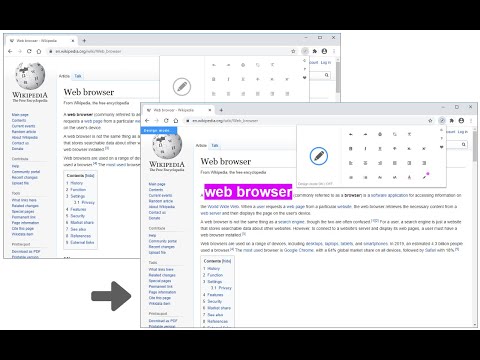
Page Edit is an extension that let you make changes to any HTML webpage. To work with this add-on, simply open the toolbar popup UI and then click on the big toggle button on the left side. Once the add-on is active, the icon turns to blue color. A - Design Mode - banner will also be shown in the current tab at the top left corner. Now, the document is ready for editing; make desired changes with the text editing buttons available in the toolbar popup UI. Once your edits are completed, click on the toggle button again to turn off the add-on. Note: to work with text editing tools in the toolbar popup UI, please first select a text and then click on the desired button in the popup. If you found a bug to report, or have a feature request in mind, please fill out the bug report form on the add-on's homepage (https://mybrowseraddon.com/page-edit.html).

Details

  • Version
    0.1.9
  • Updated
    December 11, 2025
  • Offered by
    Keller
  • Size
    240KiB
  • Languages
    English
  • Developer
    Email
    hovie.keller@gmail.com
  • Non-trader
    This developer has not identified itself as a trader. For consumers in the European Union, please note that consumer rights do not apply to contracts between you and this developer.

Privacy

Manage extensions and learn how they're being used in your organization
The developer has disclosed that it will not collect or use your data. To learn more, see the developer’s privacy policy.

This developer declares that your data is

  • Not being sold to third parties, outside of the approved use cases
  • Not being used or transferred for purposes that are unrelated to the item's core functionality
  • Not being used or transferred to determine creditworthiness or for lending purposes

Support

For help with questions, suggestions, or problems, visit the developer's support site

Related

Design Mode - Page's Rich Text Editor

4.7

Edit any page's content by switching to design mode, where you can modify the content and drag images around like a Word Editor

Page Manipulator

3.6

Inject HTML, CSS or JavaScript into any web-page. The changes you make are applied every time you visit the specified website(s).

Page Editable

4.8

Edit any webpage — no coding needed

Restyler

4.8

A devtool extension for easy restyling of any webpage

Edit Anything

4.1

Edit Anything is a simple extension that allows you to edit text on any website. Click the pencil icon to turn text editing on or…

Edit Webpage

3.9

Edit any webpage and make websites editable

Web Editor

4.2

Forget about all the Code chaos and Customize your website in a handy way

Edit Website Extension

4.6

Edit Live Websites Text On The Fly

Page Editor

4.0

Edit any website text!

No-Inspect Web Editor - text & Images

0.0

Replace the need of using inspect element. Perfect for designers, managers & marketers. No tech skills needed!

Page Text Editor

5.0

An editor to edit any webpage inline and live. Reload page to remove changes.

Easy WebPage Editor

4.3

Edit WebPage Content like Microsoft Office Word

Design Mode - Page's Rich Text Editor

4.7

Edit any page's content by switching to design mode, where you can modify the content and drag images around like a Word Editor

Page Manipulator

3.6

Inject HTML, CSS or JavaScript into any web-page. The changes you make are applied every time you visit the specified website(s).

Page Editable

4.8

Edit any webpage — no coding needed

Restyler

4.8

A devtool extension for easy restyling of any webpage

Edit Anything

4.1

Edit Anything is a simple extension that allows you to edit text on any website. Click the pencil icon to turn text editing on or…

Edit Webpage

3.9

Edit any webpage and make websites editable

Web Editor

4.2

Forget about all the Code chaos and Customize your website in a handy way

Edit Website Extension

4.6

Edit Live Websites Text On The Fly

Google apps