Item logo image for Page Capture Pro

Page Capture Pro

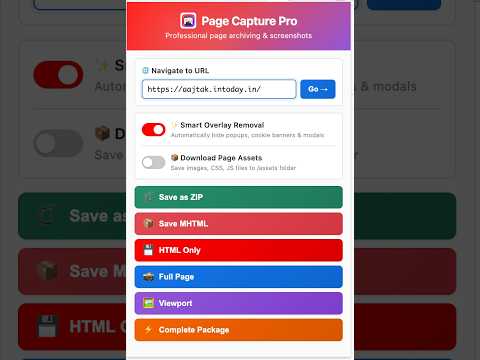
Item media 3 (screenshot) for Page Capture Pro
Item video thumbnail
Item media 2 (screenshot) for Page Capture Pro
Item media 3 (screenshot) for Page Capture Pro
Item video thumbnail
Item media 2 (screenshot) for Page Capture Pro
Item media 3 (screenshot) for Page Capture Pro

Overview

Save pages as MHTML (with CSS/images) or HTML, plus full-page screenshots and asset bundles.

Page Capture Pro lets you archive any web page in one click — as a single self-contained file, a pixel-perfect screenshot, or a complete bundle. What you can save • MHTML – one file containing the page's HTML, CSS, images, and scripts, viewable offline in Chrome or Edge. • HTML – the raw page markup. • Full-page screenshot – the entire scrollable page stitched into a single PNG (HiDPI-aware). • Viewport screenshot – just the visible area. • ZIP bundle – MHTML + full-page screenshot + the page's images, stylesheets, and scripts in one archive. Useful extras • Hide overlays – optionally suppress cookie banners, modals, and pop-ups before capturing, for clean screenshots. • Smart filenames – output is named after the page title and timestamped automatically; A/B-test preview indices are detected and included. • Quick navigation – type a URL in the popup to load it in the active tab before capturing. Everything runs locally in your browser. No accounts, no uploads, no tracking.

Details

  • Version
    2.0.3
  • Updated
    May 22, 2026
  • Offered by
    Raghunandan
  • Size
    173KiB
  • Languages
    English (United States)
  • Developer
    Email
    raghunitb@gmail.com
  • Non-trader
    This developer has not identified itself as a trader. For consumers in the European Union, please note that consumer rights do not apply to contracts between you and this developer.

Privacy

Manage extensions and learn how they're being used in your organization
The developer has disclosed that it will not collect or use your data.

This developer declares that your data is

  • Not being sold to third parties, outside of the approved use cases
  • Not being used or transferred for purposes that are unrelated to the item's core functionality
  • Not being used or transferred to determine creditworthiness or for lending purposes

Related

Full Page Screen Capture (Simple)

0.0

A simplified full page screen capture extension.

SnapShot — Screenshot & Annotate

5.0

Full-page & visible-area screenshots with built-in annotation tools — arrows, shapes, text, freehand. Copy or save as PNG.

Full Page Capture - Capture, Edit, Save

5.0

The ultimate tool for full-page screenshots! Capture, edit with powerful tools, and save entire webpages as a single PNG or PDF.

SnapCode Pro

5.0

Capture the Design, Extract the Code. High-fidelity HTML/CSS extraction and intelligent full-page screenshots for modern developers.

Lliben – Screenshot & Save as PNG/JPG/PDF

5.0

Take screenshots of the visible area, full page, selected region, or specific element. Save as PNG, JPG, or PDF.

Instant Screenshot + Copy

1.0

Capture full-page or custom area screenshots and save or copy them instantly. Fast, flexible, and private.

Screenshot

0.0

Capture full page screenshots, save as image or PDF

FullScreenie: Screenshot & Annotate

0.0

Capture full-page or visible-area screenshots, annotate, and copy or save.

SnapPage Pro - Full Page Screenshot

5.0

Capture full page screenshots with advanced editing, annotations, and export to PNG, JPEG, or PDF

Scrolling Screenshot Pro

4.0

Capture full-page screenshots of lazy-loading websites with scrolling. Annotate and save screenshots as image or pdf.

Capture Master – Full Page Screenshot & Annotation Tool

5.0

Powerful screenshot tool for full page & region captures. Annotate with text, shapes, arrows, and blur. Save as PNG, JPG, or PDF.

SnapShot: Full Page Capture & Editor

5.0

Capture full webpages, record screen, annotate and export to PNG, JPG, PDF or WebM.

Full Page Screen Capture (Simple)

0.0

A simplified full page screen capture extension.

SnapShot — Screenshot & Annotate

5.0

Full-page & visible-area screenshots with built-in annotation tools — arrows, shapes, text, freehand. Copy or save as PNG.

Full Page Capture - Capture, Edit, Save

5.0

The ultimate tool for full-page screenshots! Capture, edit with powerful tools, and save entire webpages as a single PNG or PDF.

SnapCode Pro

5.0

Capture the Design, Extract the Code. High-fidelity HTML/CSS extraction and intelligent full-page screenshots for modern developers.

Lliben – Screenshot & Save as PNG/JPG/PDF

5.0

Take screenshots of the visible area, full page, selected region, or specific element. Save as PNG, JPG, or PDF.

Instant Screenshot + Copy

1.0

Capture full-page or custom area screenshots and save or copy them instantly. Fast, flexible, and private.

Screenshot

0.0

Capture full page screenshots, save as image or PDF

FullScreenie: Screenshot & Annotate

0.0

Capture full-page or visible-area screenshots, annotate, and copy or save.

Google apps