

Page Capture Pro – Full Page Screenshot & Web Page Saver
4 ratings
)
Overview
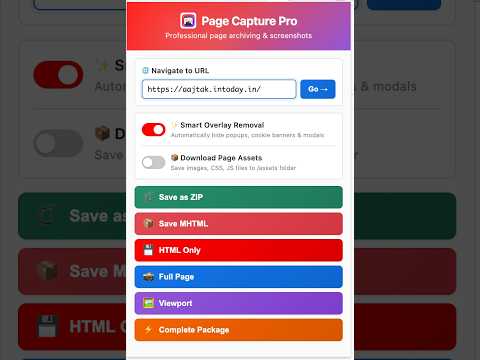
Full page screenshot & webpage saver. Save pages offline as MHTML or HTML, export ZIP bundles, and compare URLs side by side.
Page Capture Pro lets you archive any web page in one click — as a single self-contained file, a pixel-perfect screenshot, or a complete bundle — and compare pages side by side to see exactly what changed. What you can save • MHTML – one file containing the page's HTML, CSS, images, and scripts, viewable offline in Chrome or Edge. • HTML – the raw page markup. • Full-page screenshot – the entire scrollable page stitched into a single PNG (HiDPI-aware). • Viewport screenshot – just the visible area. • ZIP bundle – MHTML + full-page screenshot + the page's images, stylesheets, and scripts in one archive. • Copy to clipboard – copy a full-page or viewport screenshot and paste it straight into Slack, Jira, or a doc. Compare pages Enter two or more URLs (for example a control and its A/B-test variants) and get one visual report: • Side by side – both pages scroll together, with changed elements outlined. • Slider – drag a line to wipe between the two pages. • Blend – lay one page over the other and fade between them. • Difference – a pixel diff that highlights each changed area, with "Next change" navigation. • Content changes – title, meta description, headings, buttons, images, links, and text, word by word. The report is saved as a single HTML file you can share with anyone, even without the extension. Capture without leaving your page • Capture any URL in a temporary tab – your current page is never touched. • Batch capture – paste up to 50 URLs and get one ZIP with a folder per page. • Right-click any link – capture it, or compare it with the page you're on. • Keyboard shortcuts – Alt+Shift+S for a full-page screenshot, Alt+Shift+V for the visible area. Built for modern web apps • Captures apps that scroll inside a panel (dashboards, docs, mail) instead of the window. • Waits for single-page apps to finish loading, so you capture content, not spinners. • Handles hash routes, web components, sticky headers, and very long pages. Useful extras • Hide overlays – optionally suppress cookie banners, modals, and pop-ups before capturing, for clean screenshots. • Smart filenames – output is named after the page title and timestamped automatically; A/B-test preview indices are detected and included. • Quick navigation – type a URL in the popup to load it in the active tab before capturing. • Remembers your settings between uses. Everything runs locally in your browser. No accounts, no uploads, no tracking.
5 out of 54 ratings
Details
- Version2.6.3
- UpdatedNovember 17, 2026
- Offered byRaghunandan
- Size179KiB
- Languages7 languages
- Developer
Email
raghunitb@gmail.com - Non-traderThis developer has not identified itself as a trader. For consumers in the European Union, please note that consumer rights do not apply to contracts between you and this developer.
Privacy

This developer declares that your data is
- Not being sold to third parties, outside of the approved use cases
- Not being used or transferred for purposes that are unrelated to the item's core functionality
- Not being used or transferred to determine creditworthiness or for lending purposes