


Overview
Control video speed on YouTube, Netflix, Coursera and every site. Skip silences, hold to boost, and see how much time you save.
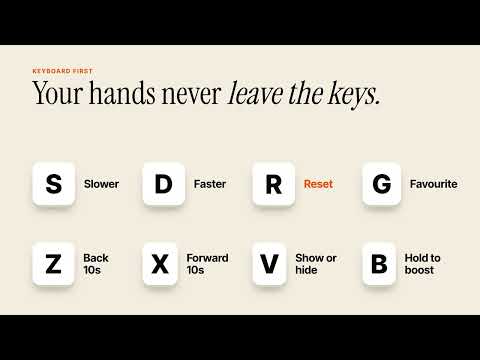
Pace: Video Speed Controller for Any Site Speed up or slow down any video in Chrome, from 0.07x to 16x. Take control of playback speed, get through lectures faster, understand tricky explanations, skip silence, and reclaim your time. Works across a wide range of websites that use standard HTML5 video players. PRECISE PLAYBACK SPEED Adjust video speed from 0.07x to 16x with fine-grained increments. Find your ideal pace for online courses, tutorials, podcasts, lectures, and everyday watching. Whether you need slower explanations or faster YouTube playback, Pace puts you in control. SKIP SILENCES Pace detects pauses in speech and plays them faster, then returns to your preferred speed as soon as someone starts speaking. Spend less time sitting through long pauses in lectures, podcasts, and talks without making speech sound rushed. Enable silence skipping in settings and choose how fast silent sections play. KEYBOARD SHORTCUTS Control your videos without reaching for your mouse. • S: Decrease speed • D: Increase speed • R: Reset to normal speed, then press again to restore your previous speed • G: Jump to your favourite speed • Z / X: Rewind or skip forward 10 seconds • V: Show or hide the on-video controller • Hold B: Temporarily boost playback speed, then release to return to your previous speed Every shortcut is customizable. Switching from Video Speed Controller? Pace uses the same default shortcuts, so you can keep your familiar workflow. REMEMBERS YOUR SPEED ON EVERY SITE Watch YouTube at 1.75x and Netflix at 1x without changing settings every time. Pace remembers your preferred speed for each website and helps prevent sites from resetting playback speed when videos change or ads interrupt playback. A CONTROLLER THAT STAYS OUT OF YOUR WAY Keep the compact on-video speed pill visible on hover, always, or never. It remains accessible in fullscreen without covering the player's controls. SEE HOW MUCH TIME YOU SAVE Track your estimated time saved this week and overall. Share your progress with a clean weekly summary card in one click. PRIVATE BY DESIGN Playback controls run locally in your browser. Pace does not collect or transmit information about the videos you watch. Anonymous feature-usage counts are optional and can be disabled in settings. YOUR VIDEOS. YOUR SPEED. YOUR TIME.
0 out of 5No ratings
Details
- Version1.0.0
- UpdatedNovember 14, 2026
- Size47.29KiB
- LanguagesEnglish
- DeveloperShubham Gajanan PawarWebsite
Plot No 47, Behind Swapnashilp Banquet Hall, Bhadgaon road, Pachora Pachora, Maharashtra 424201 INEmail
support@stryvo.techPhone
+91 84211 95477 - TraderThis developer has identified itself as a trader per the definition from the European Union and committed to only offer products or services that comply with EU laws.
Privacy

Pace: Video Speed Controller for Any Site has disclosed the following information regarding the collection and usage of your data. More detailed information can be found in the developer's privacy policy.
Pace: Video Speed Controller for Any Site handles the following:
This developer declares that your data is
- Not being sold to third parties, outside of the approved use cases
- Not being used or transferred for purposes that are unrelated to the item's core functionality
- Not being used or transferred to determine creditworthiness or for lending purposes
Support
For help with questions, suggestions, or problems, visit the developer's support site