


Overview
AI-powered conversational incident resolution with turn-by-turn guidance
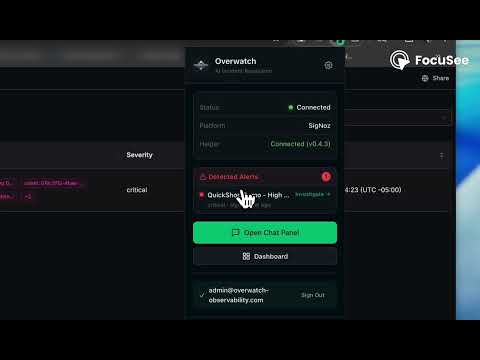
Overwatch brings AI-powered incident resolution directly into your observability tools. Stop context-switching between tabs and runbooks — get turn-by-turn resolution guidance right where you work. KEY FEATURES Automatic Alert Detection The extension monitors your observability dashboards in real time, detecting firing alerts through network-level interception and DOM analysis. Alerts are deduplicated and normalized across platforms. AI Chat Side Panel Open the Overwatch side panel (Ctrl+Shift+I / Cmd+Shift+I) for a persistent chat interface. Ask questions about active incidents and receive streaming, context-aware resolution guidance powered by AI. Multi-Platform Alert Correlation Overwatch correlates related alerts across different monitoring tools, surfacing connections you might miss when working in a single platform. Safe Command Execution Integrates with the optional Overwatch Helper agent running locally. Review and approve suggested commands before execution, with dry-run and manual approval modes. Dashboard Sync Authentication and session state sync with the Overwatch web dashboard. Your incident history, preferences, and team context carry over. HOW IT WORKS Install the extension and sign in Navigate to any supported monitoring dashboard The extension detects active alerts automatically Click the Overwatch icon or press Cmd+Shift+I to open the chat panel Ask questions, get resolution steps, and correlate alerts across platforms BUILT FOR DEVOPS TEAMS On-call engineers who need fast resolution guidance SRE teams managing alerts across multiple platforms Platform engineers troubleshooting infrastructure issues Any team that wants to reduce mean-time-to-resolution PRIVACY Overwatch connects to your organization's Overwatch backend. Alert data is processed through your configured API endpoint. No monitoring data is sent to third parties. See our privacy policy for details. KEYBOARD SHORTCUTS Ctrl+Shift+O / Cmd+Shift+O: Open popup Ctrl+Shift+I / Cmd+Shift+I: Open chat panel REQUIREMENTS An Overwatch account (sign up at overwatch-observability.com) Access to at least one supported monitoring platform Support: admin@overwatch-observability.com Documentation: https://overwatch-observability.com/docs
0 out of 5No ratings
Details
- Version3.7.0
- UpdatedSeptember 9, 2026
- Size537KiB
- LanguagesEnglish
- DeveloperOverwatch Observability LLCWebsite
555 Belaire Ave Ste 100-6009 Chesapeake, VA 23322 USEmail
admin@overwatch-observability.comPhone
+1 757-319-7794 - TraderThis developer has identified itself as a trader per the definition from the European Union and committed to only offer products or services that comply with EU laws.
- D-U-N-S144869006
Privacy

This developer declares that your data is
- Not being sold to third parties, outside of the approved use cases
- Not being used or transferred for purposes that are unrelated to the item's core functionality
- Not being used or transferred to determine creditworthiness or for lending purposes