

OverlayQA – UI Bug Tracking & Client Feedback

Overview
Design QA + website feedback tool. Detect UI bugs, run WCAG audits, compare Figma. Export to trackers
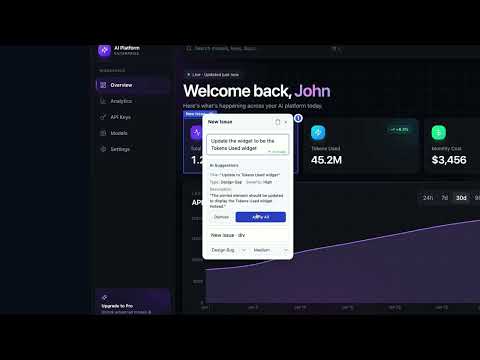
OverlayQA – UI Bug Detection & Tracking for Design QA Design QA and UI bug tracking that finds the bugs, not just records them. OverlayQA scans your pages for visual, accessibility, and design-system issues, then turns every finding into a tracked issue with a screenshot, CSS selector, and computed styles. Works on localhost, staging, and production. TWO WAYS TO USE IT Chrome extension: for localhost, staging, and login-gated pages. In-app dashboard: capture and review any public URL with no install. Great for stakeholders and clients. FIND BUGS Auto Review. Scans any page for design inconsistencies, missing interactive states, form problems, responsive gaps, dead UI, and leftover placeholder content. A local scan runs first, then OverlayQA's AI reviews a page screenshot to confirm and add findings. Accessibility Audit. axe-core WCAG scans plus AI visual analysis catch contrast, touch-target, and ARIA issues. Design Tokens and Components. Flag hard-coded colors, spacing, type, and radius that should be design tokens, and components styled inconsistently. Upload a tokens JSON or pick a Figma frame to check against your real system. Visual Comparison. Overlay a Figma frame or an uploaded image on the live page, or let AI Visual Comparison list the differences for you. TRACK FIXES Click any element to capture an issue with a screenshot, CSS selector, computed values, viewport, and browser details. AI drafts the title and description when you ask. Assign issues, add labels, attach files, and filter to what is still open. Two-way sync with more than 10+ trackers, See the full list at overlayqa.com/integrations. MCP server: work your issue list from your AI coding assistant. REVIEW WITH CLIENTS Share a review link. Clients pin comments on the live page and reply in the thread, with no account and no install. Add your logo and colors on every plan. BUILT FOR Designers checking what engineering shipped. Frontend teams catching UI bugs before release. QA engineers running design QA. Agencies reviewing a build before the client sees it. Catch UI bugs before a user bounces or a client catches them.
5 out of 51 rating
Details
- Version1.2.92
- UpdatedOctober 16, 2026
- FeaturesOffers in-app purchases
- Size1.76MiB
- LanguagesEnglish (United States)
- Developer
- Non-traderThis developer has not identified itself as a trader. For consumers in the European Union, please note that consumer rights do not apply to contracts between you and this developer.
Privacy

OverlayQA – UI Bug Tracking & Client Feedback has disclosed the following information regarding the collection and usage of your data. More detailed information can be found in the developer's privacy policy.
OverlayQA – UI Bug Tracking & Client Feedback handles the following:
This developer declares that your data is
- Not being sold to third parties, outside of the approved use cases
- Not being used or transferred for purposes that are unrelated to the item's core functionality
- Not being used or transferred to determine creditworthiness or for lending purposes
Support
For help with questions, suggestions, or problems, please open this page on your desktop browser