

OverlayQA – Visual Bug Reporting & Accessibility Audit

Overview
Report visual bugs with screenshots & CSS context. AI accessibility audits. Compare Figma designs. Export to Jira, Linear, Notion.
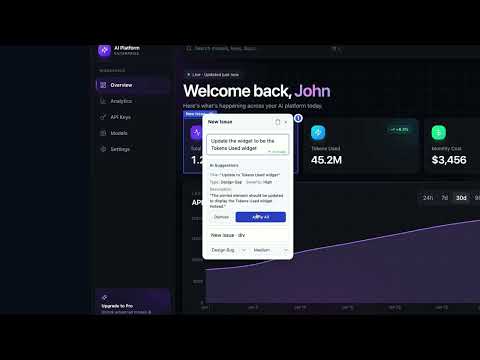
Report visual bugs, run accessibility audits, and compare Figma designs against live pages. OverlayQA is an AI-powered design QA tool that captures UI issues with full CSS context and runs WCAG scans. Works on staging, localhost, and production. FEATURES Visual Bug Reporting Click any element to report a bug with a screenshot, computed CSS, selector, viewport, and browser metadata. AI generates structured bug reports with severity and description using OpenAI. Figma Design Comparison Overlay Figma frames on any page. AI visually diffs design vs. implementation and flags mismatches in spacing, color, and layout. Accessibility Audit Run WCAG scans with axe-core plus AI visual analysis. Catch contrast, touch-target, and ARIA issues that automated tools alone miss. Design Token Audit Scan any page to extract color, typography, spacing, and border tokens. Flags inconsistencies across your site so you can enforce design system standards without manual inspection. Fix Verification Re-capture a resolved issue and let GPT-4o compare it to the original. Returns pass / fail / inconclusive with an AI explanation so you know whether the fix actually shipped. Export & Share Send issues to Jira, Linear, or Notion with one click. Share QA findings with clients and stakeholders via link. No login required. BUILT FOR Designers verifying handoff fidelity. Developers catching visual regressions. QA leads running design QA reviews. Agencies running QA before client handoff. WHAT GETS CAPTURED When you use capture, comparison, accessibility, or AI features, OverlayQA processes a screenshot of the current browser tab, the page URL and title, and details about the element you select. The issue generation, Figma comparison, accessibility audit, and fix verification features send this data to OpenAI to produce structured results. Fix verification additionally sends the original and current screenshot URLs, the issue title, description, element selector, and severity to GPT-4o so it can compare before and after states; for accessibility issues, the WCAG criterion, axe rule ID, and axe re-run results are included. Data is only processed when you actively use a feature. OverlayQA does not passively track your browsing activity. OverlayQA – Visual Bug Reporting & Accessibility Audit Full privacy policy: https://overlayqa.com/privacy/
5 out of 51 rating
Details
- Version1.2.13
- UpdatedJune 8, 2026
- FeaturesOffers in-app purchases
- Size723KiB
- LanguagesEnglish (United States)
- Developer
- Non-traderThis developer has not identified itself as a trader. For consumers in the European Union, please note that consumer rights do not apply to contracts between you and this developer.
Privacy

OverlayQA – Visual Bug Reporting & Accessibility Audit has disclosed the following information regarding the collection and usage of your data. More detailed information can be found in the developer's privacy policy.
OverlayQA – Visual Bug Reporting & Accessibility Audit handles the following:
This developer declares that your data is
- Not being sold to third parties, outside of the approved use cases
- Not being used or transferred for purposes that are unrelated to the item's core functionality
- Not being used or transferred to determine creditworthiness or for lending purposes
Support
For help with questions, suggestions, or problems, please open this page on your desktop browser