


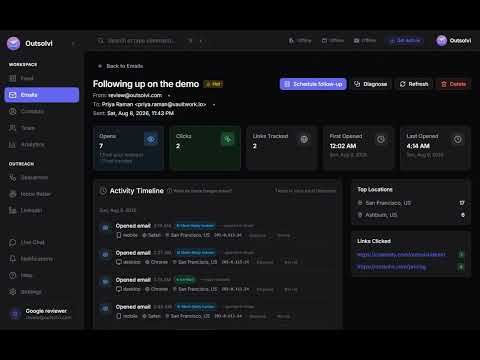
Overview
Track email opens and clicks with confidence scoring. Know who's genuinely interested.
Outsolvi tells you who actually read the emails you send from Gmail, and who just received them. WHAT YOU GET ✅ Auto-tracks every email you send, opens and clicks, with no extra steps ✅ Confidence scoring on every open, so you know if it was a genuine read or a bot ✅ Real-time desktop notification the moment someone opens your email ✅ Side panel inside Gmail with full contact history and an engagement timeline ✅ Reply detection that stops your follow-up when someone gets back to you ✅ Pre-send scoring and best send time, right in the compose window ✅ Hot lead alerts when a contact is engaging heavily WHY CONFIDENCE SCORING MATTERS Most email trackers count every pixel load. That means a corporate security scanner, an image proxy, or an automatic prefetch all look exactly like a real person reading your email. You get a number that feels good and means nothing. Outsolvi scores each open and tells you how confident it is. When it says five opens, that number is worth acting on. HOW IT WORKS Sign in once. After that it is automatic. Write and send in Gmail exactly the way you already do. Outsolvi adds an invisible tracking pixel to the message you are sending and wraps the links inside it, then reports engagement back to your Outsolvi dashboard. WHAT IT DOES NOT DO This extension does not read your inbox. It only looks at the compose window, and only at the message you are writing. It does not track messages other people send to you. It does not ask for access to your Google account. This extension requests no Gmail API permissions at all. It never sells your data. If you want reply detection across your whole mailbox, you can connect it separately inside the Outsolvi web app. That is your choice, it is not required for open and click tracking, and this extension is not what does it. WHO IT IS FOR Salespeople, recruiters, founders, and anyone whose job depends on knowing whether a message landed. REQUIREMENTS You need an Outsolvi account. Free trial at my.outsolvi.com, no card needed. Paid plans at outsolvi.com/pricing. Support: support@outsolvi.com Privacy policy: https://outsolvi.com/privacy
5 out of 51 rating
Details
- Version2.10.3
- UpdatedOctober 21, 2026
- Size142KiB
- LanguagesEnglish
- DeveloperWebsite
Email
dev@outsolvi.com - Non-traderThis developer has not identified itself as a trader. For consumers in the European Union, please note that consumer rights do not apply to contracts between you and this developer.
Privacy

Outsolvi: Email Tracking for Gmail has disclosed the following information regarding the collection and usage of your data. More detailed information can be found in the developer's privacy policy.
Outsolvi: Email Tracking for Gmail handles the following:
This developer declares that your data is
- Not being sold to third parties, outside of the approved use cases
- Not being used or transferred for purposes that are unrelated to the item's core functionality
- Not being used or transferred to determine creditworthiness or for lending purposes
Support
For help with questions, suggestions, or problems, visit the developer's support site