

Outscribe: rescue your AI chats

Overview
Save a whole ChatGPT or Claude conversation as snippets, curate what mattered, and continue fresh. Local-first.
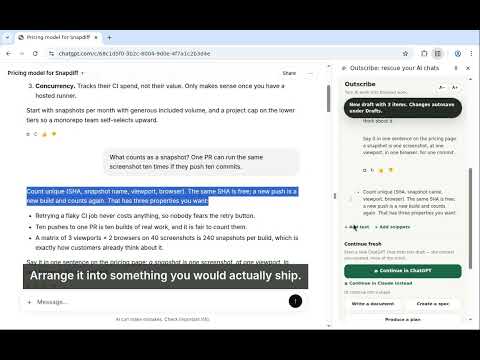
Your chat is cooked. Your work isn't. Every heavy AI user knows the moment: 300 messages deep, the model is repeating itself, the good thinking is buried somewhere in the scroll, and starting over means losing it all. Outscribe is the rescue. SAVE THE WHOLE CONVERSATION Open the chat, click Save conversation. Every turn becomes a snippet, tagged with the chat's title, link, and order. Long chat still loading? Save again: re-saves merge, nothing duplicates. Works on chatgpt.com and claude.ai, and when a page can't be read live, import the official ChatGPT or Claude data export instead, parsed entirely on your device. FIND THINGS THE WAY YOU REMEMBER THEM In your own chats, you navigate by the questions you asked. Outscribe renders a rescued conversation the same way: your questions as the index, the answers as the material: a FAQ of your own thinking. Snippets group by conversation with one-click Select all. CURATE ONE DRAFT Tick what mattered and pull it into a single ordered draft. Reorder by drag, edit any text in place (edits never mutate the captured original), add bridging notes, and watch it autosave. CONTINUE FRESH, WITH ONLY THE GOOD CONTEXT One click opens a new ChatGPT chat that starts from your curated draft: the context you chose, none of the sludge. Prefer Claude? Continue there instead: your draft is copied, a new chat opens, paste and go. This is how you merge several chats, even across ChatGPT and Claude, and continue as one. OR SHIP IT Copy as clean Markdown, download a .md file, send a private page to Notion, or draft a post on X. Nothing is ever posted or sent without your click. LOCAL-FIRST, PROVABLY Your snippets and drafts live in your browser. Your text never leaves your device unless you explicitly export it. Optional anonymous usage signals are counts and categories only (the event format cannot represent your text), and there's an off switch in the panel. Made for people who do real work in AI chats: writers, founders, researchers, engineers: anyone who has ever lost an evening's thinking to a dead conversation. Keep the thinking. Ship the work.
0 out of 5No ratings
Details
- Version0.1.5
- UpdatedOctober 11, 2026
- Size1.19MiB
- LanguagesEnglish
- Developer
Email
jhetchan@gmail.com - Non-traderThis developer has not identified itself as a trader. For consumers in the European Union, please note that consumer rights do not apply to contracts between you and this developer.
Privacy

Outscribe: rescue your AI chats has disclosed the following information regarding the collection and usage of your data. More detailed information can be found in the developer's privacy policy.
Outscribe: rescue your AI chats handles the following:
This developer declares that your data is
- Not being sold to third parties, outside of the approved use cases
- Not being used or transferred for purposes that are unrelated to the item's core functionality
- Not being used or transferred to determine creditworthiness or for lending purposes
Support
For help with questions, suggestions, or problems, visit the developer's support site