


Overview
Stop logging LinkedIn outreach by hand. Track connection requests, contacts and messages, then sync the ones you pick to HubSpot.
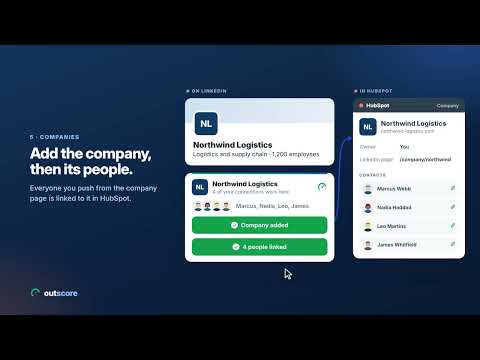
Add LinkedIn contacts and conversations to HubSpot in one click, and see which outreach is actually working. Stay on LinkedIn. Outscore tracks your activity by itself, syncs it in one click, and shows your CRM on every profile. Add anyone and their company to HubSpot from their LinkedIn profile in one press, deduped by LinkedIn URL. Then log the full conversation on the contact as notes your AI assistant can read, or as LinkedIn message activities. No automation: Outscore never sends invitations or messages for you. The only thing it does on LinkedIn for you is withdraw an invitation you pick, when you press Withdraw. It reads what you already see. Connect HubSpot in about two minutes with your own key; Outscore guides you on HubSpot's page, and the key stays in your browser. Can't create a key yourself? Ask your admin in one click, or start right away, read only, with your own HubSpot personal key. Free: • Everything for 14 days, no credit card. • "In HubSpot" or "Not in HubSpot" on every LinkedIn profile you open, with their HubSpot record one click away. • Your first 10 contacts to HubSpot, so you see real contacts land before paying anything. • Know what's working: every request you send is tracked on its own (accepted, pending, declined or withdrawn), with your acceptance rate, reply rate, days to accept, invitations pending over 60 days, and your funnel from sent to replied. • One small button on LinkedIn opens a side panel: what moved since your last look, and who needs you next. • Your own notes on every person. • Chat with support right from the dashboard. Outscore Pro ($10 a month, billed yearly, or $15 month to month): • Add the people you pick to HubSpot as contacts, with company, job title, LinkedIn URL and owner. Matched by LinkedIn URL and email and written fill-only, so re-sending updates the same person and never overwrites your CRM data. • Log a conversation on the contact as notes or as LinkedIn message activities, each message with its real date. Logging again adds only the new messages. • Your next step with each person, right on their LinkedIn profile: their HubSpot owner, stage and lead status, their open tasks, and recent activity as a timeline of emails, calls, meetings and LinkedIn messages. • Plan the next task in a tap, change their HubSpot properties from the card, and pick exactly which fields go to HubSpot. • Their company in HubSpot, with its open and past deals, read only. • Newly accepted connections pushed to HubSpot after each sync, if you turn it on. • Needs you after your first 14 days: who replied, who accepted and who you haven't messaged yet, with one click to each. How many need you stays free. • Your full list, CSV export for any other tool, and scheduled updates to a file or a webhook. For sales teams: a HubSpot admin sets up the connection once, for one rep or for the whole team with one link. Each rep runs Outscore on their own account and decides what reaches the CRM. Managers see the contacts and the rates in HubSpot, never anyone's messages. Your data is yours. Outscore reads only pages you could see yourself and keeps your tracking and your saved conversations in your browser. It is never sold and never reported to your employer. Contacts move only when you choose: a CSV you download, or a push you start, straight from your browser to your own HubSpot. When your admin sets up your HubSpot key, it travels encrypted, and only your browser can open it. Outscore sends only anonymous usage counts, never your contacts or your messages. Pricing: • Free to start: everything for 14 days, then your stats stay free forever. No credit card. • Outscore Pro: $10 a month, billed yearly, or $15 month to month. Privacy policy: https://www.getoutscore.com/privacy Terms of service: https://www.getoutscore.com/terms Refund policy: https://www.getoutscore.com/refund Contact: https://www.getoutscore.com/contact Common questions Does it work with HubSpot's free CRM? Yes. You do not need a paid HubSpot plan. Do I need Sales Navigator? No. It works with regular LinkedIn, and alongside Sales Navigator if you have it. What if I can't create a HubSpot key? Press Ask my admin. Outscore sends your admin a link that sets the key up in about two minutes, for you or for your whole team, and Outscore switches over by itself when it arrives. Until then you can connect read only with your own HubSpot personal key and see HubSpot on every profile. Will it create duplicate contacts in HubSpot? No. Contacts are matched by LinkedIn URL and email and written fill-only. Can my AI assistant read my LinkedIn conversations? If your assistant reads your HubSpot, log the conversation as notes. HubSpot's own MCP server lists notes among the activities it reads, and does not list LinkedIn messages. Does anything reach HubSpot without me choosing it? No. Only the people and conversations you pick, or the newly accepted connections if you turn that on. Does it act on LinkedIn for me? Only when you ask, one person at a time. It never sends invitations or messages. When you press Withdraw on someone, it withdraws that one invitation for you, or opens LinkedIn's own withdraw box for your click. Is it cheaper than per-seat LinkedIn-to-CRM tools? Yes. Most charge $30 to $110 per seat per month, plus credits. Outscore Pro is $10 a month, billed yearly, or $15 month to month, with no credits. Bought lifetime before? You keep it for life. What does it not do? It does not send connection requests or messages, does not scrape profiles in bulk, and does not sell credits or find emails for people you have not connected with. Not affiliated with LinkedIn or HubSpot.
Details
- Version3.2.4
- UpdatedNovember 11, 2026
- FeaturesOffers in-app purchases
- Size590KiB
- LanguagesEnglish
- DeveloperWebsite
Email
hello@connectiontracker.org - Non-traderThis developer has not identified itself as a trader. For consumers in the European Union, please note that consumer rights do not apply to contracts between you and this developer.
Privacy

Outscore: LinkedIn Tracker and HubSpot Sync has disclosed the following information regarding the collection and usage of your data. More detailed information can be found in the developer's privacy policy.
Outscore: LinkedIn Tracker and HubSpot Sync handles the following:
This developer declares that your data is
- Not being sold to third parties, outside of the approved use cases
- Not being used or transferred for purposes that are unrelated to the item's core functionality
- Not being used or transferred to determine creditworthiness or for lending purposes
Support
For help with questions, suggestions, or problems, visit the developer's support site


