

Outscore: LinkedIn to HubSpot Sync and Tracker

Overview
HubSpot on every LinkedIn profile. Add people and their company in one click, then log the conversation. Only the ones you pick.
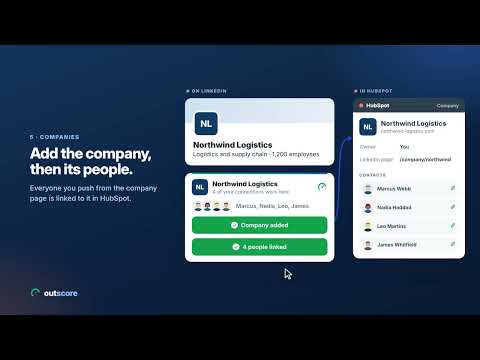
LinkedIn and HubSpot, finally talking to each other. See each person's HubSpot record on their LinkedIn profile. Add them and their company to HubSpot in one click, then log your conversation. Only the people you choose. Works with HubSpot. On LinkedIn, Outscore shows you: • On every profile: "In HubSpot" or "Not in HubSpot", with the owner, the stage and your next step. • Not in HubSpot yet? Add to HubSpot creates the contact and their company, matched by LinkedIn URL and email and written fill-only, so it never duplicates or overwrites your data. • In a conversation: Log to HubSpot puts the messages on the contact, each with its real date, as notes your AI assistant can read or as LinkedIn message activities. Choose Keep logging and new messages go in each time you open the thread. • Change the record without leaving LinkedIn: owner, stage, lead status, email, phone, plus tasks and your next step. • On a company page: whether the company is in HubSpot and how many people you know there. • Needs you: follow-ups due, people who accepted and got no message, people not in HubSpot yet. • And what's working, free: acceptance rate, reply rate, days to accept, invitations pending over 60 days, and your funnel from sent to replied. No automation: Outscore never sends invitations or messages for you. The only thing it does on LinkedIn for you is withdraw an invitation you pick, when you press Withdraw. It reads what you already see. Connect HubSpot in about two minutes with your own key. Outscore sets it up on HubSpot's own page and shows you each step; the one click there is yours, and the key stays in your browser. Can't create a key yourself? Ask your admin in one click, or start right away, read only, with your own HubSpot personal key. Free: • Everything for 14 days, no credit card. • "In HubSpot" or "Not in HubSpot" on every LinkedIn profile you open. • Your first 10 contacts to HubSpot, with their conversations, so you see real records land before paying anything. • Your acceptance rate, reply rate and funnel, free forever. • One small button on LinkedIn opens a side panel: what moved since your last look, and who needs you next. • Your own notes on every person, and chat with support from the dashboard. Outscore Pro ($10 a month, billed yearly, or $15 month to month): • Unlimited contacts and conversations to HubSpot. • Your next step with each person on their profile: owner, stage and lead status, open tasks, and recent activity as a timeline of emails, calls, meetings and LinkedIn messages. • Plan and change tasks, edit HubSpot properties from the card, and pick which fields go to HubSpot. • Their company in HubSpot, with its open and past deals, read only. • People who accept your invitation added to HubSpot after each read, beyond your free adds. • Needs you after your first 14 days: names and one-click actions. How many need you stays free. • Your full list, CSV export, and scheduled updates to a file or a webhook. For sales teams: a HubSpot admin sets up the connection once, for one rep or the whole team with one link. Each rep runs Outscore on their own account and decides what reaches the CRM. Managers see the contacts and the rates in HubSpot, never anyone's messages. Your data is yours. Outscore reads only pages you could see yourself and keeps your tracking and your saved conversations in your browser. It is never sold and never reported to your employer. Contacts and conversations go straight from your browser to your own HubSpot, or to a CSV you download. When your admin sets up your key, it travels encrypted, and only your browser can open it. Your HubSpot email is kept on our server for setup help, your receipt and occasional product news, with an unsubscribe link in every email. Apart from that, Outscore sends only anonymous usage counts, never your contacts or your messages. Pricing: • Free to start: everything for 14 days, then your stats stay free forever. No credit card. • Outscore Pro: $10 a month, billed yearly, or $15 month to month. Bought lifetime before? You keep it for life. Privacy policy: https://www.getoutscore.com/privacy Terms of service: https://www.getoutscore.com/terms Refund policy: https://www.getoutscore.com/refund Contact: https://www.getoutscore.com/contact Common questions Does it work with HubSpot's free CRM? Yes. You do not need a paid HubSpot plan. Do I need Sales Navigator? No. It works with regular LinkedIn, and in Sales Navigator too. What if I can't create a HubSpot key? Press Ask my admin. Outscore sends your admin a link that sets the key up in about two minutes, for you or your whole team, and switches over by itself when it arrives. Until then you can connect read only with your own HubSpot personal key. Will it create duplicate contacts in HubSpot? No. Contacts are matched by LinkedIn URL and email and written fill-only. Can my AI assistant read my LinkedIn conversations? If your assistant reads your HubSpot, log the conversation as notes. HubSpot's own MCP server lists notes among the activities it reads, and does not list LinkedIn messages. Does anything reach HubSpot without me pressing a button? One thing, and only if you choose automatic tracking: people who accept your invitation are added after each read. One checkbox on the dashboard turns it off. Everything else goes only when you press. Does it act on LinkedIn for me? Only when you ask, one person at a time. It never sends invitations or messages. When you press Withdraw on someone, it withdraws that one invitation for you, or opens LinkedIn's own withdraw box for your click. Is it cheaper than per-seat LinkedIn-to-CRM tools? Yes. Most charge $30 to $110 per seat per month, plus credits. Outscore Pro is $10 a month, billed yearly, or $15 month to month, with no credits. What does it not do? It does not send connection requests or messages, does not scrape profiles in bulk, and does not sell credits or find emails for people you have not connected with. Not affiliated with LinkedIn or HubSpot. "LinkedIn" is a trademark of LinkedIn Corporation. "HubSpot" is a trademark of HubSpot, Inc.
5 out of 53 ratings
Details
- Version3.2.8
- UpdatedNovember 19, 2026
- FeaturesOffers in-app purchases
- Size2.09MiB
- LanguagesEnglish
- DeveloperWebsite
Email
hello@connectiontracker.org - Non-traderThis developer has not identified itself as a trader. For consumers in the European Union, please note that consumer rights do not apply to contracts between you and this developer.
Privacy

Outscore: LinkedIn to HubSpot Sync and Tracker has disclosed the following information regarding the collection and usage of your data. More detailed information can be found in the developer's privacy policy.
Outscore: LinkedIn to HubSpot Sync and Tracker handles the following:
This developer declares that your data is
- Not being sold to third parties, outside of the approved use cases
- Not being used or transferred for purposes that are unrelated to the item's core functionality
- Not being used or transferred to determine creditworthiness or for lending purposes
Support
For help with questions, suggestions, or problems, visit the developer's support site