

Outlook Copilot Reply Assistant with M365 Copilot
Overview
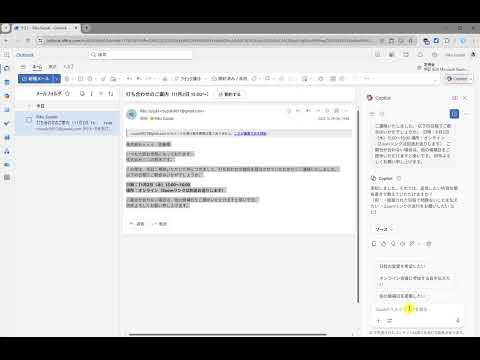
Automatically pastes selected email content from Outlook on the web into M365 Copilot side panel and optionally sends it with Enter.
# Outlook Copilot Reply Assistant with M365 Copilot A Chrome extension that efficiently creates email replies in Outlook on the web by leveraging M365 Copilot. ## 📖 Introduction Composing business email replies is a time-consuming task. This extension bridges Outlook on the web and M365 Copilot, enabling you to send received email content to Copilot with a single click and generate appropriate reply text. **Ideal for:** - Professionals who need to respond to large volumes of emails daily - Users who want to minimize time spent composing business emails - Those looking to streamline email workflows with M365 Copilot - Organizations seeking to standardize signature and salutation formats **Features:** - 🚀 **One-Click Operation** - Launch Copilot instantly from the right-click menu - ⚡ **Fast Processing** - Auto-paste and send in 3-6 seconds - 🌐 **Multilingual Support** - Available in Japanese and English - 🎨 **Customizable** - Freely edit prompt templates - 🔒 **Privacy Protected** - Email content is never stored ## 📋 Prerequisites To use this extension, you need the following: ### Required - **Google Chrome** or **Microsoft Edge** browser - **Microsoft 365** account (Business or Enterprise) - **M365 Copilot** license - Access to **Outlook on the web** ### Verification Steps 1. Log in to [Outlook on the web](https://outlook.office.com/) 2. Check if the "Copilot" icon appears on the right side of the mail screen 3. Click the Copilot icon to verify that the Copilot pane opens > **Note**: M365 Copilot is a paid service requiring a license. If unavailable, please contact your organization's administrator. ## Key Features ### 🎯 **Simple Operation** - Select email body text - Choose "Draft Reply with Copilot" from the right-click menu - M365 Copilot opens automatically with custom prompt and email content pasted - Optional auto-send functionality ### 🤖 **Smart Prompts** - Business email-specific prompt templates - Automatic sender signature extraction and salutation conversion - Auto-configured personal signatures - Efficient generation of reply content only ## Usage ### 📧 **Basic Usage** #### Step 1: Open Email 1. Access [Outlook on the web](https://outlook.office.com/) 2. Open the email you want to reply to #### Step 2: Select Email Body 3. Drag your mouse to select the portion of the email body you want to reference - Including sender name and signature generates more appropriate replies - You can also select only necessary information #### Step 3: Execute Extension 4. **Right-click** on the selected text 5. Choose **"Draft Reply with Copilot"** from the menu #### Step 4: Copilot Auto-Execution 6. M365 Copilot side panel opens automatically 7. Prompt and email content are pasted automatically 8. Auto-sent based on settings (Default: ON) #### Step 5: Enter Reply Content 9. Respond to Copilot's questions with your desired reply content - Example: "Acknowledge receipt and inform that I'll handle it next Monday" 10. Copilot generates an appropriate business email reply #### Step 6: Review and Use Reply 11. Review the generated reply text 12. Edit as needed 13. Copy and paste into Outlook's reply screen ### ⚙️ **Customization** #### Opening Options - Click the extension icon in the browser toolbar - Click the "Options" button #### Customizable Settings 1. **Auto-Send Settings** - ON: Automatically sends Enter key after pasting prompt (Default) - OFF: Paste only, manual send required 2. **Prompt Template** - Edit default prompts - Reset with "Reset to Default" button - Different templates for Japanese and English 3. **Language Settings** - Switch between Japanese / English - Auto-detects browser language (first time only) - Manually changed settings are preserved ### 💡 **Usage Tips** - **Selection Tips**: Including sender's signature (e.g., "John Doe, ABC Corporation") enables automatic conversion to proper salutations like "Dear Mr. Doe" - **Prompt Customization**: Specify reply tone and format in prompt templates - **Multiple Emails**: Simply repeat the same operation for consecutive replies - **Custom Prompts**: Customize prompts to match your organization's writing style and signature rules ### 🌐 **Supported Sites** - `https://outlook.office.com/*` - `https://outlook.office365.com/*` - M365 Copilot iframe (auto-detected) ## Privacy - **Data Destination**: Microsoft 365 Copilot only - **Local Storage**: Prompt templates and settings only - **Email Content**: Never stored - **External Services**: None used ## Troubleshooting ### 🔍 **Common Issues** **Q: Right-click menu doesn't appear** - A: By design, only displayed on Outlook domains **Q: Copilot doesn't open** - A: Verify you're logged into Microsoft 365 **Q: Doesn't work after the first time** - A: Reset settings with `window.resetToDefaults()` **Q: Slow performance** - A: Latest version is significantly optimized ## Permissions This extension requires the following permissions: - **contextMenus**: Create right-click menu items - **storage**: Save user preferences (prompt templates, settings, language) - **tabs**: Cross-tab messaging and Copilot tab management - **webNavigation**: Detect and communicate with Copilot iframes All permissions are strictly necessary for core functionality. No data collection or tracking occurs. ## Support ### 💼 Enterprise Usage We offer paid support for enterprise deployments and customization. **Contact:** - Website:http://www.satorifactory.jp/ - Developer: Satori Factory ### ☕ Support & Donations If this extension is helpful, please consider supporting continued development. (https://www.buymeacoffee.com/satorifactory)
0 out of 5No ratings
Details
- Version1.0.1
- UpdatedNovember 11, 2025
- Offered bysatori.factory.2024
- Size31.65KiB
- Languages2 languages
- Developer株式会社さとりファクトリ
平町1丁目24−3 目黒区, 東京都 152-0032 JPEmail
IT@satorifactory.jpPhone
+81 90-9736-8990 - TraderThis developer has identified itself as a trader per the definition from the European Union and committed to only offer products or services that comply with EU laws.
- D-U-N-S964462454
Privacy

This developer declares that your data is
- Not being sold to third parties, outside of the approved use cases
- Not being used or transferred for purposes that are unrelated to the item's core functionality
- Not being used or transferred to determine creditworthiness or for lending purposes