

Outlook Calendar Automation
7 ratings
)
Overview
Automate calendar invites for Outlook with role-based templates, custom time windows, and timezone-aware scheduling
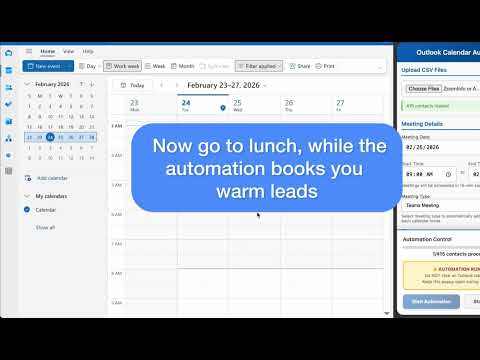
Outlook Calendar Automation -- The Fastest Way to Schedule Meetings at Scale Outlook Calendar Automation is a powerful Chrome extension that lets you create and send personalized Outlook calendar invites in bulk, directly from a CSV file. Stop spending hours manually creating meeting invitations one by one: 1. Upload your contacts 2. Configure your templates, and 3. Let the automation handle the rest. Whether you're a sales rep booking discovery calls, an account manager scheduling client check-ins, or a recruiter lining up interviews, Outlook Calendar Automation saves you hours every week by turning a repetitive, error-prone task into a single click. KEY FEATURES > Bulk CSV Upload Upload one or more CSV files with your contacts. The extension intelligently maps columns -- First Name, Company, Email, Job Title, Timezone, and more -- regardless of your CSV's naming conventions. Works seamlessly with exports from ZoomInfo, Salesforce, HubSpot, and other CRMs. > Role-Based Message Templates Create multiple message templates that automatically match based on job title keywords. Send a tailored message to C-suite executives, a different one to IT Directors, and a default fallback for everyone else -- all in a single automation run. > Rich Text & Email Signature Support Message templates support full rich text: bold, italic, hyperlinks, images, and pasted email signatures with logos. Your calendar invites look exactly as polished as if you'd written them by hand. > Timezone-Aware Scheduling Enable AUTO Timezone Mode and the extension automatically adjusts meeting times so each contact receives an invite at a convenient hour in their local timezone. Supports GMT offsets, US timezone abbreviations (EST, CDT, PST, etc.), and many international formats. > Custom Time Windows Define your own scheduling window (e.g., 9:00 AM to 5:00 PM) and the extension generates 15-minute meeting slots across the range. Need morning-only meetings? Afternoon blocks? Full-day coverage? You control it all. > Zoom & Teams Meeting Integration Automatically attach a Zoom or Microsoft Teams meeting link to every calendar invite. One toggle -- no copy-pasting meeting URLs. > Dynamic Placeholders Use FIRST_NAME and COMPANY_NAME placeholders in both your meeting titles and message bodies. Each invite is personalized automatically for the recipient. > Country Filtering When your CSV contains contacts from multiple countries, a built-in filter lets you select exactly which countries to include before starting automation. > Smart Default Date The meeting date defaults to 3 business days from today (skipping weekends), so you're always scheduling at a professional cadence right out of the box. > Real-Time Progress Tracking Watch the automation work with a live progress bar, per-contact status updates, and detailed logging. Know exactly where you are in the queue at all times. > Automatic Focus Management The extension manages browser tab focus for you. No need to manually click on the Outlook tab -- just start the automation and let it run. Visual indicators show you the live status. > Confirmation Before Sending A confirmation overlay appears on the Outlook page before any invites go out, showing you exactly how many contacts will be processed, the meeting date, and the time window. Nothing sends until you confirm. HOW IT WORKS 1. Open Outlook Web -- Navigate to outlook.office.com and sign in. 2. Open the Side Panel -- Click the extension icon to open the configuration panel. 3. Upload Your CSV -- Drag and drop or browse for one or more CSV files. 4. Set Meeting Details -- Choose the date, time window, and meeting type (Zoom, Teams, or none). 5. Customize Templates -- Create role-based templates with personalized titles and messages. 6. Click Start -- Review the confirmation overlay and hit "Confirm & Start." Sit Back -- The extension clicks New Event, fills in the title, adds the attendee, sets the date/time, pastes your message, and sends -- for every contact in your list. USE CASES > Sales Outreach: Book discovery calls and demos with dozens of prospects in minutes instead of hours. Personalize by job title so VPs get a different message than managers. > Account Management: Schedule quarterly business reviews or check-in calls across your entire book of business in one session. > Recruiting: Line up interview slots for multiple candidates, each with a personalized invite and the correct timezone. > Event Coordination: Send meeting invitations to attendees across time zones with automatic timezone adjustments. > Customer Success: Proactively schedule onboarding calls or renewal meetings with new and existing customers at scale. Frequently Asked Questions (FAQ) > Which version of Outlook does this work with? Outlook Calendar Automation works with Outlook Web App (outlook.office.com and outlook.office365.com). It does not work with the Outlook desktop application. > What CSV format do I need? Any CSV with columns for First Name, Company, and Email will work. The extension flexibly maps common column name variations (e.g., "firstname", "First Name", "email_address", "Email Address"). Optional columns for Job Title, Country, and Timezone unlock advanced features like role-based templates and timezone scheduling. > How does timezone-aware scheduling work? You specify a time window that represents the desired meeting time in your contact's local timezone. The extension calculates the offset and schedules the invite at the corresponding time on your Outlook calendar. For example, if you want contacts in CDT (GMT-5) to receive 8:00 AM meetings and you're in EDT (GMT-4), the invite shows as 9:00 AM on your calendar. > Can I use this with Zoom or Teams? Yes. Select "Zoom Meeting" or "Teams Meeting" from the Meeting Type dropdown, and the extension will automatically attach the appropriate meeting link to each invite. > Is my data secure? All contact data is processed locally in your browser. CSV information is never sent to external servers. The only network call the extension makes is to validate your license key. No contact names, emails, or company information leaves your machine. > How many contacts can I process at once? You can process up to 250 contacts per automation session. For larger lists, simply run multiple sessions. > Do I need a license? Yes, a valid license key is required. After purchase, you'll receive a key via email in the format OUTLOOK-XXXX-XXXX-XXXX-XXXX. WHY CHOOSE OUTLOOK CALENDAR AUTOMATION? > Purpose-Built for Outlook: Designed specifically for Outlook Web App -- not a generic tool retrofitted for calendar use. > Massive Time Savings: What takes hours manually takes minutes with automation. Users report saving 3-5 hours per week. > Personalization at Scale: Role-based templates ensure every recipient gets a relevant, tailored message -- not a generic blast. > Timezone Intelligence: Schedule across time zones without mental math or spreadsheet calculations. > Zero Learning Curve: Upload a CSV, configure a few settings, click Start. No APIs, no integrations, no technical setup. > Privacy First: Your data stays in your browser. Period. READY TO RECLAIM HOURS OF YOUR WEEK? Install Outlook Calendar Automation today and transform how you schedule meetings. Stop the tedious copy-paste cycle and start sending personalized, timezone-aware calendar invites at scale -- all from a single CSV upload.
5 out of 57 ratings
Details
- Version2.4.0
- UpdatedMarch 19, 2026
- Offered byKaizen Lifestyle
- Size92.09KiB
- LanguagesEnglish
- Developer
Email
support@kaizen.lifestyle - Non-traderThis developer has not identified itself as a trader. For consumers in the European Union, please note that consumer rights do not apply to contracts between you and this developer.
Privacy

Outlook Calendar Automation has disclosed the following information regarding the collection and usage of your data. More detailed information can be found in the developer's privacy policy.
Outlook Calendar Automation handles the following:
This developer declares that your data is
- Not being sold to third parties, outside of the approved use cases
- Not being used or transferred for purposes that are unrelated to the item's core functionality
- Not being used or transferred to determine creditworthiness or for lending purposes