

Outliner

Overview
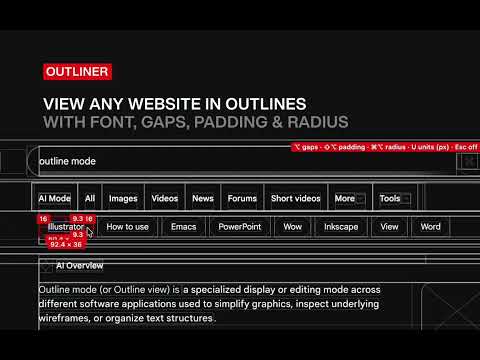
Outline any page in one shortcut. See boxes, gaps, spacing, radiuses and font specs, in relative units or pixels.
Show outlines of any page in one shortcut. See boxes, gaps, spacing, radiuses and font specs, in relative units or pixels. Press Cmd/Ctrl+Shift+O and every element gets its box drawn, so you can see how the layout is built. Press Esc to exit. Hover anything and you also get the specs: • Hover over type for size and line height, as authored • Hold Opt/Alt to see padding, margins and the space between elements • Hold Cmd/Ctrl + Opt/Alt see see corner radius on anything • Hold Shift + Opt/Alt for width and height • Units: press U to switch between relative units and pixels There’s no account, no tracking and no setup. Built for designers and developers who want to see the structure first and get the numbers when they need them.
0 out of 5No ratings
Details
- Version1.28.0
- UpdatedOctober 14, 2026
- Offered byFS
- Size35.21KiB
- LanguagesEnglish (United Kingdom)
- Developer
Email
hello@finniansturdy.com - Non-traderThis developer has not identified itself as a trader. For consumers in the European Union, please note that consumer rights do not apply to contracts between you and this developer.
Privacy

This developer declares that your data is
- Not being sold to third parties, outside of the approved use cases
- Not being used or transferred for purposes that are unrelated to the item's core functionality
- Not being used or transferred to determine creditworthiness or for lending purposes