

Outfit Lens - AI Outfit Finder | Find Clothes by Image & Shop

Overview
AI outfit finder: click any fashion photo to find similar clothes and accessories from online stores.
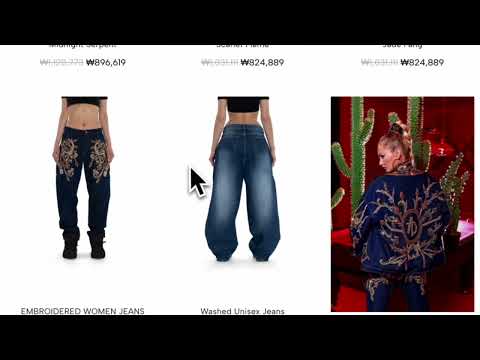
[Outfit Lens — AI Outfit Finder] Want to find clothes by picture? It breaks any outfit down into individual items — jacket, shoes, bag, each one separately — and finds similar clothes you can buy right now. Free. No sign-up. One click to install. [FOUR WAYS TO START] → Hover Badge: hover any product photo and click the magnifier — fastest way → Screen Capture: select any area on any webpage → Upload: choose a photo from your device → Clipboard Paste: copy an image and paste Works everywhere: Instagram, Pinterest, TikTok, fashion blogs, online magazines, and more. [WHAT YOU GET] → AI detects each item individually — tops, bottoms, shoes, bags, accessories → Matching products from real stores with direct purchase links → Filter by shipping destination — tired of finding the perfect jacket only to discover it doesn't ship to your country? Set your location once and only see items that deliver to you → Sort by price — find the same style at $30 or $300. Your budget, your choice → Re-search by drag — select any area of the analyzed image to search just that part → Save the pieces you are still deciding on — the panel keeps them, and shows the current price when you come back. eBay items are kept as a link to the eBay listing → Real-time progress as the AI works through each item [AFFILIATE DISCLOSURE — HOW OUTFIT LENS MAKES MONEY] Outfit Lens takes part in affiliate programs. Some of the shopping links in your results are affiliate links, and we may earn a commission when you buy through one — at no extra cost to you. The price you pay is the same either way. Our affiliate partners are Rakuten Advertising, CJ Affiliate, Admitad and eBay Partner Network. The extension is free, needs no account, and never charges you. Inside the extension, every results screen carries an affiliate disclosure in the results header, which stays on screen as you scroll, and again in the footer. If you reached a shop through another publisher's affiliate link from one of these networks, the extension stands down in that tab: the hover badge does not appear, and neither the results of a search you start there nor your saved items carry our affiliate links, so we do not overwrite a referral that another publisher earned. [WHAT MAKES IT DIFFERENT] Most tools treat your photo as one object. This one sees each item individually. → Fashion-specific AI that recognises 14 kinds of clothing and accessories, from tops and shoes to bags and sunglasses → Detects multiple items in one image (jacket, pants, shoes — each found separately) → Shoppable results from real stores, right in the side panel → Keep browsing while you shop. Your results stay open in the side panel next to the page [REAL USE CASES] → You see a jacket on Instagram → it finds similar jackets across multiple stores, sorted by price → Your favorite influencer posts a full outfit → you find every piece and discover affordable alternatives → You screenshot a street style look → paste it and get results for the entire outfit in seconds → You like a bag in a Pinterest pin → the AI isolates it from the full photo and finds similar ones to buy [HOW IT WORKS] 1. Hover any product photo and click the magnifier — or open the side panel to capture, upload, or paste 2. AI identifies each clothing item and finds similar products 3. Browse results with direct shopping links — all in the side panel That's it. Three steps, zero hassle. Hit "Add to Chrome" and try it on the next outfit that catches your eye. [YOUR PRIVACY MATTERS] → No account, no cross-site tracking — install and start using immediately → Images are analyzed only when you choose to — never automatically → Site access is used only to show the search badge and read the image you pick. The extension does not read page text, forms, or your browsing history → Your selected images are processed for search only and are not stored → Some stores do not serve every region. To hide them where they do not, the extension may read your device's time zone. That happens on your device, and the time zone is not sent to us [WHAT'S NEW] → Styled with — the section of products shown together with your item has a name, and the ? beside it says what the section shows → Saved items: the list now scrolls however many you keep, items that have left our results are marked as such, and Undo brings back one you removed → When no similar products are found, the panel now says so and offers Select an area, so you can search one part of the image → Saved eBay items are kept as a link to the eBay listing, without its title, price or photo → The badge and the panel stay off payment pages such as PayPal and Klarna → Hover to search — a magnifier badge appears on any product photo you hover. One click analyzes the whole image → Turn it off anytime — right-click the Outfit Lens icon to toggle the badge Stop saving screenshots of outfits you'll never find again. Install it — and never lose a look.
5 out of 51 rating
Details
- Version3.6.4.11
- UpdatedOctober 20, 2026
- Size10.75MiB
- Languages11 languages
- DeveloperWebsite
Email
ksj0109188@gmail.com - Non-traderThis developer has not identified itself as a trader. For consumers in the European Union, please note that consumer rights do not apply to contracts between you and this developer.
Privacy

Outfit Lens - AI Outfit Finder | Find Clothes by Image & Shop has disclosed the following information regarding the collection and usage of your data. More detailed information can be found in the developer's privacy policy.
Outfit Lens - AI Outfit Finder | Find Clothes by Image & Shop handles the following:
This developer declares that your data is
- Not being sold to third parties, outside of the approved use cases
- Not being used or transferred for purposes that are unrelated to the item's core functionality
- Not being used or transferred to determine creditworthiness or for lending purposes
Support
For help with questions, suggestions, or problems, visit the developer's support site