

OtterPage — Full Page Screenshot & Editor

Overview
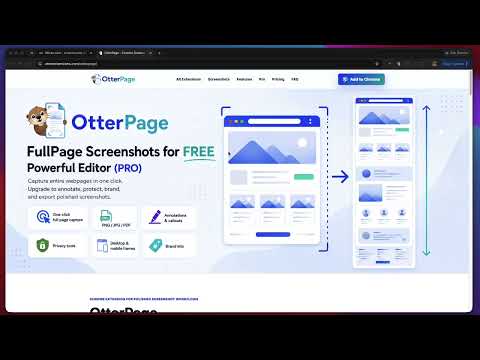
Full page screenshot tool with editor. Capture, annotate, redact, brand, and export PNG, PDF, or ZIP — 100% local & private.
Take a full page screenshot of any website in one click. OtterPage captures the entire scrolling page, the visible screen, a selected element, or a batch of URLs at once — then helps you annotate, blur and redact sensitive details, add browser or mobile frames, apply brand kits, resize for social media, and export as PNG, JPG, PDF, paginated PDF, clipboard copy, or ZIP. Everything is captured, edited, and exported locally in your browser. Your screenshots never leave your device — making OtterPage ideal for QA bug reports, client deliverables, documentation, audits, and marketing content. ✨ Core Features ✅ Capture full-page or regular viewport screenshots. ✅ Trigger captures from the toolbar popup, keyboard shortcut, right-click menu, or direct toolbar action. ✅ Capture selected elements and custom regions. ✅ Batch-capture multiple URLs into one local ZIP. ✅ Use desktop or mobile viewport mode for Bulk Capture. ✅ Improve long-page captures with lazy-load pre-scroll, fixed/sticky element handling, and app-style scroll container support. ✅ Edit screenshots with crop, resize, text, shapes, arrows, callouts, steps, highlights, stamps, emojis, blur, pixelate, redaction, spotlight, and magnifier tools. ✅ Retake Desktop or Mobile screenshots from the editor and continue editing. ✅ Add browser, iPhone, or Android frames. ✅ Use full-page or screen-height frame presets with scroll placement controls. ✅ Add branded headers, footers, logos, watermarks, URLs, dates, and timestamps. ✅ Resize outputs for social media: Landscape, Portrait, Square, Story, or custom saved sizes. ✅ Create multiple Brand Kits for clients, teams, or recurring workflows. ✅ Save reusable presets that combine frames, branding, social sizes, export settings, and watermarks. ✅ Apply Brand Kit presets manually or automatically after capture. ✅ Export to PNG, JPG, PDF, paginated PDF, clipboard, drag-and-drop image, or ZIP. 🔒 Privacy-First Workflow ✅ Screenshots are captured and processed locally in your browser. ✅ OtterPage does not upload your screenshots to our servers. ✅ Editing, redaction, branding, social sizing, PDF export, and ZIP generation happen on your device. ✅ Payment and license management are handled by ExtensionPay and Stripe. 👥 Built For OtterPage is built for product teams, marketers, designers, QA testers, researchers, agencies, consultants, and anyone who needs reliable screenshots for bug reports, launch reviews, product walkthroughs, audits, competitive research, client reports, or documentation. 🚀 Free And Pro Free: unlimited full-page and viewport captures, keyboard shortcuts, right-click capture, and PNG/JPG/clipboard export — no account required. Pro adds the advanced workflow suite: the full editor (callouts, steps, blur, redaction, and more), element and region capture, browser and device frames, Brand Kits, social media sizes, reusable presets, and Bulk URL Capture. 🆕 New In Version 1.0.3 ✅ Improved the Pro upgrade experience for paid users. Feature-level PRO badges now hide after a user has an active Pro license, while the main green PRO status pill remains visible. ✅ Updated the upgrade prompt copy to make it clear that Pro unlocks all OtterPage Pro tools, not just the individual feature that opened the prompt. ✅ Added the installed extension version number to the Options page so users and support can quickly confirm which build is installed. 🆕 New In Version 1.0.2 ✅ Added page right-click capture options. Users can right-click on a webpage and start either a Full Page capture or a Regular capture from the OtterPage Capture menu. ✅ Added reusable custom social media sizes. Users can define a custom output size with a name, width, and height, save it, and reuse it later from the Social media sizes workflow and Brand Kit presets. ✅ Added Brand Kit selection inside the Branding panel. Users can switch branding between different client Brand Kits directly from the result page without applying a full preset or changing the current frame and social size settings. 👉 Full changelog and version history at otterextensions.com
5 out of 52 ratings
Details
- Version1.0.3
- UpdatedJune 9, 2026
- FeaturesOffers in-app purchases
- Size582KiB
- LanguagesEnglish (United States)
- DeveloperEspinalLab, LLCWebsite
2003 Hardee Cir Kennesaw, GA 30152-1105 USEmail
support@espinallab.comPhone
+1 678-977-3414 - TraderThis developer has identified itself as a trader per the definition from the European Union and committed to only offer products or services that comply with EU laws.
- D-U-N-S030807559
Privacy

OtterPage — Full Page Screenshot & Editor has disclosed the following information regarding the collection and usage of your data. More detailed information can be found in the developer's privacy policy.
OtterPage — Full Page Screenshot & Editor handles the following:
This developer declares that your data is
- Not being sold to third parties, outside of the approved use cases
- Not being used or transferred for purposes that are unrelated to the item's core functionality
- Not being used or transferred to determine creditworthiness or for lending purposes
Support
For help with questions, suggestions, or problems, please open this page on your desktop browser