


Overview
Click, hover, or select Chinese on any page: instant dictionary, translation, pinyin, stroke order, audio & save to OtterDict.
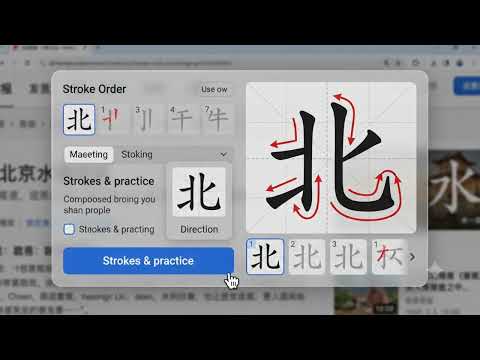
OtterDict ( Formerly KoiSpeak.com ) turns any webpage into a Chinese reading tool. Reading Chinese online ( news, Wikipedia, social media, textbooks ) usually means copy-pasting characters into a separate dictionary and losing your place. OtterDict puts the dictionary right on the page. Click a character, hover with Shift, or select a whole passage, and a clean bubble appears with exactly what you need. No account required, and it's free. Look up any character, instantly - Click any Chinese character → a compact bubble shows the word, pinyin, HSK level, definitions, and an example sentence. - Shift + hover over characters to look them up without click through a long passage. - Select a passage of Chinese → get an instant translation into your language Built for actually learning the language - Pinyin tone colors - pinyin is color-coded by tone (1 red · 2 orange · 3 teal · 4 green) so tones stick as you read. The diacritic is always shown too, so color is never the only signal. - Audio pronunciation - a "speaker" button reads any word or passage - Animated stroke order - expand a single character to see its radical, its component breakdown, and a stroke-by-stroke writing animation you can replay. Fast, in-page search - Press Ctrl+Shift+F (⌘+Shift+F on Mac) anywhere to open a search palette over the page - type a word or pinyin, get live suggestions, hit Enter to open the full entry on OtterDict. - Or right-click any selected Chinese text to look it up on OtterDict in a new tab. Yours to configure - Toggle each feature on or off: click-to-look-up, Shift+hover, selection-translate, audio, tone colors. - Pick your display language (Auto / Tiếng Việt / English / Korean / Chinese ... etc) and a translation target from ~130 languages. - Choose a light, dark, or adaptive theme - adaptive shows the bubble in the opposite shade of the page so it always stands out. - Everything applies live, no page reload. Private by design - No lookup history is stored or synced - nothing local - The extension only contacts OtterDict's API, and only when you click or select - never on every keystroke, never in the background. - It ships no tracking and requests only the permissions it needs.
5 out of 54 ratings
Details
- Version1.0.34
- UpdatedAugust 30, 2026
- Size1.83MiB
- LanguagesEnglish
- DeveloperTDH SoftwareWebsite
27, 447A street Tang Nhon Phu Ward Tang Nhon Phu Ward, Ho Chi Minh City 70000 VNEmail
contact@tdhsoft.com - Non-traderThis developer has not identified itself as a trader. For consumers in the European Union, please note that consumer rights do not apply to contracts between you and this developer.
Privacy

OtterDict - Free Chinese Dictionary has disclosed the following information regarding the collection and usage of your data. More detailed information can be found in the developer's privacy policy.
OtterDict - Free Chinese Dictionary handles the following:
This developer declares that your data is
- Not being sold to third parties, outside of the approved use cases
- Not being used or transferred for purposes that are unrelated to the item's core functionality
- Not being used or transferred to determine creditworthiness or for lending purposes
Support
For help with questions, suggestions, or problems, please open this page on your desktop browser