


Overview
Password manager with built-in 2FA, and safe sign-in for your AI agents. Fills logins and codes on any page. Free to start.
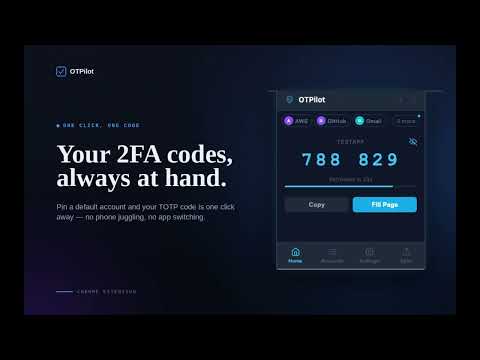
🔐 OTPilot — Password manager with built-in 2FA Fills your password and your 2FA code on any login page. End-to-end encrypted, synced across devices, free to start. And new in 2.1: let your AI agents sign in, without ever seeing your passwords. 🤖 NEW in 2.1 - AI agents that sign in safely Claude Code, Codex, Cursor or any MCP agent can sign in to websites, pass the 2FA step and run commands with the accounts you allow. OTPilot uses your passwords and 2FA codes for them, and the agent only gets the result. ✅ You approve each agent, and each account it may use, right in the extension ✅ Allow just the 2FA code, the full sign-in, or chosen fields — for an hour, a day, or until you revoke it ✅ "Ask me every time" for sensitive accounts ✅ Signs in only on the account's own website, and every secret is removed from what the agent sees ✅ An activity log of everything each agent did, and one-click revoke Connect an agent with: npx -y @otpilot/mcp connect 🔑 Passwords, filled where you sign in OTPilot shows your saved logins right inside the sign-in field. Pick one and it fills your username and password — nothing is filled without your click. ✅ Saves new logins as you sign in ✅ Updates the password when you change it ✅ Works when the username and the password are on separate pages ✅ Suggests a strong password in every new-password field 🚀 Zero-click 2FA When a verification code field appears, OTPilot automatically: • Detects the code field • Fills the current code instantly • Submits the form No phone switching. No copy/paste. No interruptions. ⚡ One-click 2FA setup When you enable 2FA on a website, OTPilot detects the setup page and asks: "Save [Service] to OTPilot?" Click Add account and you're done — and if you already have a login for that site, the code is added to it. ✅ No QR scanner apps ✅ No copying secret keys ✅ No manual setup 📧 Email verification codes, auto-filled Waiting for a one-time code by email? When a login page asks for an emailed code, OTPilot reads it from your open webmail tab and fills it in the moment it arrives. Your email is processed entirely on your device and is never sent anywhere. You can turn this off anytime in Settings. 🗂️ More than passwords Keep secure notes, servers and API keys next to your logins. Add your own fields, grouped in sections, and link related items to an account — open it and everything about it is there. Filter by tag, type, or accounts with a 2FA code. 🔓 Inline unlock If your vault is locked, OTPilot shows an unlock prompt directly on the page. Type your master password and press Enter — OTPilot unlocks and fills immediately, without opening the popup. 👥 Multiple accounts on the same site Work + personal, several admins, staging and production: OTPilot finds every matching account and lets you pick the right one in one click. ☁️ End-to-end encrypted sync Sync your vault across browsers and devices. 🔒 Encrypted on your device before upload 🔒 The server never sees your passwords or secrets 🔒 A recovery key restores your vault if you forget your master password 👨👩👧 Share with your team Share a whole item, or just the fields you choose, with teammates and collections — end-to-end encrypted. OTPilot shows exactly what each person will get before you share. Or share live 2FA codes only: your teammate gets the code, never the secret. 🖥️ Device management Manage every connected browser from the OTPilot dashboard. • View connected devices and sync history • Remotely disconnect devices • Wipe vault access on next sync • Get email alerts for new device connections 📲 Import from anywhere • Google Authenticator: screenshot its "Transfer accounts" QR codes and select them — decoded entirely on your device • Your browser or another password manager: import its CSV export 💾 Smart backup & restore Export an encrypted backup (or a CSV) of the accounts you choose. When restoring, OTPilot detects what's already in your vault, so newer entries are never overwritten. 🛡️ Privacy first • AES-256-GCM encryption for every item • Master password protected with PBKDF2 (600,000 iterations) • Locks itself after the time you choose • Email codes are read only on your device — never transmitted • AI agents never receive a password or a code: each account you allow is encrypted to the agent's own key • No telemetry or analytics • Open source 💳 Plans • Free: unlimited 2FA codes, up to 50 passwords, notes and other items, and 1 AI agent with up to 3 accounts • Personal: $3/month or $30/year — unlimited items, sync and AI agents • Team: $8/month or $80/year per workspace, 5 seats included 🌍 Works everywhere OTPilot supports any standard TOTP-based two-factor authentication (RFC 6238): if a site lets you use an authenticator app, it works with OTPilot. Coming from OTPilot 1.x? Your accounts move into the new encrypted vault automatically.
5 out of 52 ratings
Details
- Version2.1.3
- UpdatedOctober 15, 2026
- FeaturesOffers in-app purchases
- Size311KiB
- LanguagesEnglish
- DeveloperWebsite
Email
alberto@paparelli.com.ar - Non-traderThis developer has not identified itself as a trader. For consumers in the European Union, please note that consumer rights do not apply to contracts between you and this developer.
Privacy

OTPilot has disclosed the following information regarding the collection and usage of your data. More detailed information can be found in the developer's privacy policy.
OTPilot handles the following:
This developer declares that your data is
- Not being sold to third parties, outside of the approved use cases
- Not being used or transferred for purposes that are unrelated to the item's core functionality
- Not being used or transferred to determine creditworthiness or for lending purposes
Support
For help with questions, suggestions, or problems, please open this page on your desktop browser