


概要
Organize your organization
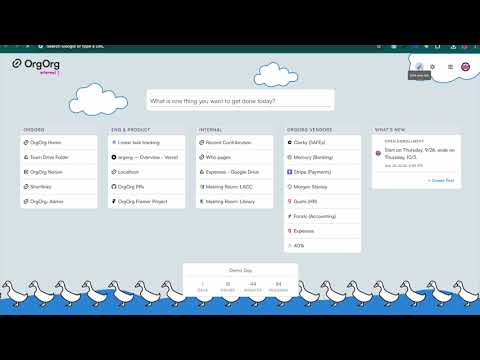
Experience seamless information sharing across your organization with the OrgOrg Chrome Extension. Designed as a unified solution for effortless communication, OrgOrg combines a branded new tab experience, internal shortlinks, and screen recordings—all centered around one goal: making it easy to share information. Branded New Tab Experience Every time an employee opens a new tab, they’re greeted with a custom, company-branded information hub. Administrators can create a tailored dashboard that displays the most important quick links, key updates, countdowns to major milestones, news, and more ensuring that important information is always front and center. Internal Shortlinks Streamline access to essential resources with branded shortlinks. Whether it’s documents, tools, or frequently visited pages, create memorable links (using custom prefixes like go/ or jump/) that simplify navigation. Easily create and discover important links within your organization, keeping everyone informed and connected. Go links make it easy to get to the information that is most important, go/salesdeck, go/vision, go/timeoff, etc. Screen Recordings Enhance your team’s communication with built-in screen recording capabilities. Capture demos, training sessions, quick walkthroughs, customer support videos, etc. and share them instantly. This feature makes it simple to convey complex ideas visually, supporting clear and effective information exchange. OrgOrg unifies these powerful features into one cohesive platform, transforming the way your team shares and accesses information. Whether updating colleagues with the latest company news or guiding them through new processes, OrgOrg makes every piece of information easily accessible and shareable. Try OrgOrg today and see how effortless collaboration and communication can be. All OrgOrg features are built for clarity, user privacy, and minimal intrusion, OrgOrg transforms the way your team collaborates. Including: • User-centric design: App controls and dark/light mode for a customizable experience • Privacy & Compliance: Engineered to meet Google Chrome’s extension guidelines with minimal permissions and robust data protection. • Effortless Communication: Share information seamlessly across your organization to build alignment and work better together.
5 点満点で 59 件の評価
詳細
プライバシー

OrgOrg から、お客様のデータの収集と使用に関する以下の情報が開示されています。 詳しくは、デベロッパーの privacy policy をご確認ください。
OrgOrg は次を扱います。
このデベロッパーは、お客様のデータについて以下を宣言しています
- 承認されている以外の用途で第三者に販売しないこと
- アイテムの中心機能と関係のない目的で使用または転送しないこと
- 信用力を判断する目的または融資目的で使用または転送しないこと
サポート
質問や提案、問題がある場合は、パソコンのブラウザでこのページを開いてください