


Overview
Fast and easy order pickwave generator - Seller tool
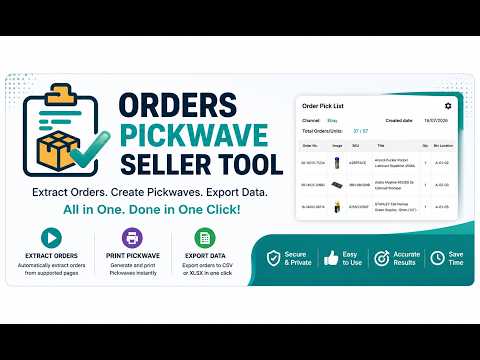
🚀 Orders Pickwave Seller Tool Stop wasting time manually creating order pick lists. **Orders Pickwave Seller Tool** automates the entire Pickwave creation process, allowing you to extract orders, generate professional pick lists, print them instantly, and export your data in seconds. Whether you're processing a handful of orders or hundreds every day, this extension helps you work faster, stay organised, and reduce picking mistakes. ⚡ Why You'll Love It Instead of copying order information manually, the extension automatically collects everything you need and builds a clean Pickwave that's ready to print. ✔ Generate Pickwaves with a single click ✔ Automatically extract all available orders ✔ Print professional Pick Lists instantly ✔ Export data to CSV or Excel (XLSX) ✔ Save hours of manual work every week ✔ Reduce picking errors ✔ Built for speed and simplicity 📦 Smart Order Processing The extension intelligently processes supported order pages by: • Automatically returning to the first page before scanning • Automatically selecting the maximum items-per-page setting for faster extraction • Scanning every available page • Detecting multi-line orders correctly • Counting **Unique Orders** and **Total Units** separately • Providing real-time progress updates throughout the process No manual page-by-page work required. 🖨️ Professional Pickwave Printing Generate clean, easy-to-read Pick Lists designed for warehouse and packing workflows. Each Pickwave includes: • Order Number • Product Image • SKU • Product Title • Quantity • Bin Location (optional) The layout is designed to make picking faster and more accurate. 🎨 Fully Customisable Print Layout Everyone works differently. That's why the Pickwave can be customised to suit your workflow. Choose exactly how your Pickwave looks by adjusting: • Font Size • Cell Padding • Font Colour • Product Images • Bin Location • Visible Columns Changes are reflected instantly before printing. 📊 Export Your Data Need your orders in spreadsheet format? Export your Pickwave data in seconds. Supported formats: • CSV • Microsoft Excel (XLSX) Perfect for reporting, record keeping or importing into other systems. 📈 Live Process Log Know exactly what's happening while the extension works. The built-in Process Log shows: ✔ Channel detected ✔ Current page being scanned ✔ Orders extracted ✔ Items-per-page status ✔ Completion status Everything happens transparently, so you always know the current progress. 💨 Designed for High-Volume Sellers Whether you're processing 20 orders or hundreds each day, Orders Pickwave Seller Tool helps you: ✅ Save valuable time ✅ Reduce manual work ✅ Improve picking accuracy ✅ Generate consistent Pickwaves ✅ Export data quickly 🔒 Privacy First Your privacy matters. Orders Pickwave Seller Tool: • Does **not** collect personal information • Does **not** sell your data • Does **not** send order information to external servers • Processes information locally within your browser whenever possible You stay in control of your data at all times. ⭐ Simple Workflow 1. Open a supported seller order page. 2. Click **Start**. 3. Wait while orders are extracted. 4. Print your Pickwave or export your data. That's it. No complicated setup. No manual copying. Just faster order processing. ⚠️ Performance Note Some users may experience slower processing during exports. This is not a bug, but a limitation of how browser-based data extraction works. This extension reads data directly from the page (DOM). It can only extract information that is fully loaded and visible on your screen. If the page loads slowly due to internet speed or system performance, the extraction process will automatically pause and wait until the content is ready. 💡 For best performance: - Use a stable and fast internet connection - Allow the page to fully load before starting export - Avoid running multiple heavy tabs simultaneously This ensures faster and more reliable results when exporting listing data. 💬 We Value Your Feedback We're continually improving Orders Pickwave Seller Tool with new features, performance improvements, and quality-of-life updates. If you have suggestions or encounter any issues, please use the **Support** button inside the extension or contact us through the Chrome Web Store. Thank you for choosing **Orders Pickwave Seller Tool** — helping sellers process orders faster, smarter, and with greater accuracy.
0 out of 5No ratings
Details
- Version1.1.0
- UpdatedJuly 30, 2026
- Size2.26MiB
- LanguagesEnglish
- DeveloperWebsite
Email
ebay.template80@gmail.com - Non-traderThis developer has not identified itself as a trader. For consumers in the European Union, please note that consumer rights do not apply to contracts between you and this developer.
Privacy

Orders Pickwave Seller Tool has disclosed the following information regarding the collection and usage of your data. More detailed information can be found in the developer's privacy policy.
Orders Pickwave Seller Tool handles the following:
This developer declares that your data is
- Not being sold to third parties, outside of the approved use cases
- Not being used or transferred for purposes that are unrelated to the item's core functionality
- Not being used or transferred to determine creditworthiness or for lending purposes
Support
For help with questions, suggestions, or problems, please open this page on your desktop browser