


Overview
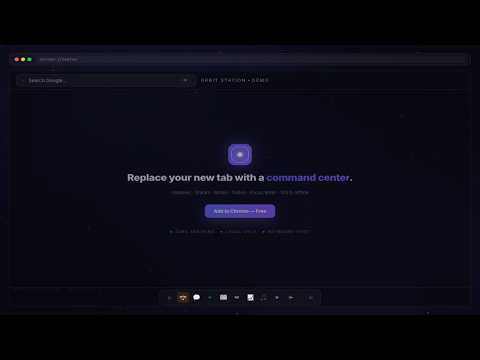
Open your whole workflow in one click. Tab stacks, command palette, session capture, daily focus. Local-first & private.
Orbit Station turns every new tab into a one-click workflow launcher. Build tab stacks that open your morning routine, deep-work session, or meeting prep in a single click — or launch them with a browser-wide hotkey from any Chrome tab. Search, launch, Ask AI, and navigate with a keyboard-first command palette. A privacy-first new-tab dashboard — local-first by default, with optional cross-device sync (Pro) when you want your setup on every device. WHY ORBIT STATION ONE CLICK = ENTIRE WORKFLOW Tab stacks open 5, 10, or 20 tabs at once. Save your morning routine, research mode, or meeting prep — then launch the whole set from any new tab, or assign Cmd/Ctrl+Shift+1–9 and fire it from any Chrome tab (not just the new tab). Mid-flow? Session Capture (Cmd/Ctrl+Shift+0) saves every open tab as one launchable stack, with a “reopen last session” cue to jump back in. Park a single page with Save for later (Cmd/Ctrl+Shift+L) — find it in the sidebar or palette. KEYBOARD-FIRST COMMAND PALETTE Press Cmd/Ctrl+K to search links, launch stacks, jump workspaces, capture a session, save for later, reopen your last session, or Ask ChatGPT, Claude, Gemini, or Perplexity (opens their sites in a new tab — Orbit never sends your prompt to a server). No mouse required. FOUR WAYS TO SEE YOUR STUFF Galaxy (visual), Grid (fast), List (keyboard), and Board (Kanban). Switch with a keystroke. EVERYTHING IN ONE PLACE Notes, todos with due dates and recurring tasks (try “standup every weekday”), a Today chip so nothing slips, calendar, Pomodoro timer with optional ambient soundscapes (generated locally, off by default), read-later queue, and optional weather — all in the Tools sidebar (Cmd+.). DAILY ATMOSPHERE, YOUR WAY A rotating backdrop, quote, clock, greeting, streak, and one clear daily focus. Choose a built-in cosmic wallpaper pack, upload your own image (stored on your device only), or opt in to a daily web photo. Tint the UI with your accent color. START WITH YOUR SITES ALREADY ON SCREEN Onboarding can import open tabs and top bookmarks so your first new tab is useful. Import bookmarks or tabs anytime; recent tabs stay one click away in the sidebar. LOCAL-FIRST, SYNC WHEN YOU WANT Links, workspaces, notes, todos, and wallpapers live in your browser. By default the extension makes zero external network requests — we cannot see your data. Want it everywhere? Pro + Google sign-in enables optional cloud sync (encrypted in transit, row-level security). Free stays fully local and account-free. No ads, no data sale — ever. YOUR DATA, YOUR FILE One-click JSON export of your entire setup. Open it, move it, delete it. Genuinely yours. PRIVACY YOU CAN VERIFY • Free: no account, no sign-in, fully local • Pro: optional sync — Google sign-in (openid/email/profile only) when you choose • No advertising, no data sale, no tracking pixels • Built-in and custom wallpapers stay on your device (custom never uploads) • Synced data is protected by per-account row-level security • Delete cloud data or your account anytime from Settings • Opt-in only (OFF by default): Weather (lat/long to Open-Meteo), daily web photo (Picsum CDN, no personal data), anonymous activation analytics (event names only — never URLs or content) • AI Ask / Launch AI stack only open the provider sites you pick — Orbit does not call AI APIs • Privacy: https://orbitstation.app/privacy • Terms: https://orbitstation.app/terms PERMISSIONS, EXPLAINED • storage — Saves your setup locally • tabs — Import Open Tabs, Save current window as stack, and Save this tab for later (only when you trigger those actions, including via shortcuts you set) • sessions — Recent Tabs in the sidebar • bookmarks — Import Bookmarks (read-only unless you opt in) • search — Hands search-bar queries to your default search engine • identity — Optional Pro Google sign-in only; Free users never sign in None of these are used for background monitoring or data collection. WHAT'S NEW v1.6.2 — Orbit Station Pro is here NEW • Real-time cross-device sync: galaxies, stacks, notes and todos on every Chrome you sign into • Encrypted cloud backup so nothing you build is ever lost • Share whole workspaces with teammates as one package • One-click 14-day free trial from Settings or the command palette (⌘K → “Pro”) • Manage billing in-app: update your card, switch plans, or cancel any time FROM 1.6.1 — POWER • Browser-wide stack hotkeys, recurring/natural-language todos, read-later, AI Ask from the palette UNCHANGED • Free: no account, unlimited workspaces, zero external requests by default • Pro is optional — $4.99/mo or $39/yr after the trial, cancel anytime SUPPORT https://orbitstation.app/support Built by Omnivurse Technologies.
5 out of 52 ratings
Details
- Version1.6.2
- UpdatedSeptember 10, 2026
- FeaturesOffers in-app purchases
- Size1.64MiB
- LanguagesEnglish (United States)
- DeveloperBishara Raymond TannousWebsite
4790 N Citation Dr. #103 Delray Beach, FL 33445 USEmail
vrt@olyron.comPhone
+1 561-398-2552 - TraderThis developer has identified itself as a trader per the definition from the European Union and committed to only offer products or services that comply with EU laws.
Privacy

Orbit Station — New Tab OS has disclosed the following information regarding the collection and usage of your data. More detailed information can be found in the developer's privacy policy.
Orbit Station — New Tab OS handles the following:
This developer declares that your data is
- Not being sold to third parties, outside of the approved use cases
- Not being used or transferred for purposes that are unrelated to the item's core functionality
- Not being used or transferred to determine creditworthiness or for lending purposes
Support
For help with questions, suggestions, or problems, please open this page on your desktop browser