

Orbit Station — New Tab & Productivity Dashboard

Overview
Transform your new tab into a productivity dashboard. Launch tab stacks in 1 click, manage tasks, navigate with a command palette.
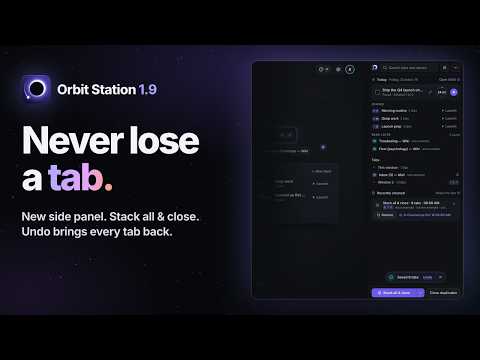
Turn your new tab into a calm, local-first home, with stacks that reopen your sites in one click, a keyboard-first command palette and a choice of six looks. Key features • Never Lose a Tab (new in 1.9) Click the Orbit icon to bring up the side panel beside any page: today's focus, the timer, your stacks, your read-later list and what is open in every window, grouped by window and searchable. "Stack all & close" skips pinned and playing tabs, saves the rest of the window as one stack, checks it, then closes what it saved; Undo puts them back where they were. "Close duplicates" shows every extra copy first and keeps the pinned or most recent one. Recently cleaned keeps your last 10 clean-ups on this device, so you can restore one or save it as a stack later. Find any open tab from the panel or the command palette. • Six Looks, Switch Any Time New users start on Clean: greeting, clock, search, today's focus, a timer, your stacks and your sites in one calm layout, with a dark, light or automatic theme. Galaxy, the signature style, shows your workspaces as textured planets, and existing users keep it as their look. Focus keeps one big clock, one intention and a timer. Photo rotates through five illustrated landscapes, one a day. Paper is quiet and editorial, with your reading list and to-dos. When you first install, you can pick one or skip the choice. Switch later with the button at the top of the screen, the P key, the command palette or Settings › Appearance, and undo it if you change your mind. Pick an accent color, add a weather widget, and in Galaxy set a built-in wallpaper, upload your own (it stays on your device) or opt in to a daily photo. • High Contrast, Adjustable Choose the accent color (six presets or your own), the contrast level (Soft, Strong or Maximum), a dark or light background, text size (100%, 115% or 130%), a thicker focus ring and reduced motion, with a live readout of the contrast ratios. Single-key shortcuts such as G, P and / can be turned off for speech input or switch devices. • Workflow Launcher Save the pages you need for a task, such as your morning routine, as a stack and reopen them all at once. A keyboard shortcut (Cmd/Ctrl+Shift+1–9) can launch it from anywhere in the browser once you set one. Session Capture (Cmd/Ctrl+Shift+0) turns the current window into a stack, and Save for later (Cmd/Ctrl+Shift+L) parks the site you are on in your read-later list. • Keyboard-First Command Palette (Cmd/Ctrl + K) Get around without the mouse. Find your links, stacks, notes and to-dos, launch one, switch workspaces, capture the current session, or send a question to an AI assistant of your choice. Asking opens the assistant's website with your question already filled in; no server of ours sits in between. • 4 Flexible Views Galaxy, where each category is a textured planet drawn on your device; Grid for fast access; List as a table with a shortcut column; and Board for a Kanban workflow. A reading board has To Read, In Progress and Completed columns. All four are there in every style: press G, D, L or B, or pick one from that same button. • Built-In Daily Tools & Dashboard - Notes, and to-dos with natural-language due dates (e.g., "standup every weekday") - A chip for today's intention, and daily streaks - Integrated calendar, read-later queue, and focus timer with local ambient sounds - A Tools sidebar on Cmd/Ctrl+. and, once you allow it, recently closed pages ready to reopen • Local-First Privacy Your links, workspaces, notes and to-dos are stored in your browser, and the free plan needs no account. Everything the side panel lists stays on your device, and your clean-up history (Recently cleaned) is never synced or sent anywhere. No ads, no data sold to third parties, and no usage analytics unless you turn them on yourself. Icons for your saved links load from DuckDuckGo's public icon service, which receives only each site's domain; open or recently closed pages and bookmarks that are only listed show a generic icon and send nothing. The Photo landscapes and all fonts ship inside the extension. Weather and the daily photo stay off until you turn them on. Uninstalling brings up a short survey, and loading it sends us only the version number. A few rough, anonymous details (about how long it was installed, which view and look you used, and whether you finished setup) stay in your browser and are sent only if you submit the survey, never with an ID, your links or your searches. Pro adds cloud sync: once you sign in and turn it on (buying Pro from the extension turns it on for you), your links, notes, to-dos, boards, calendar and settings are stored in your account, encrypted in transit and at rest. • Import & Export — Your Data Is Yours Bring in your open tabs and bookmarks when you start ("Bring your sites") and any time from Import (press I). Bookmarks are read only after you allow it, and never changed. Export your workspaces and settings as a JSON file whenever you want. Pro users can delete their cloud data and account from Settings. Permissions • storage: keeps your setup in your browser, plus one "used Orbit" flag in Chrome's own sync storage, so another computer on the same account skips the welcome tab • tabs: imports open tabs, saves the current window or the page you are on, lists them in the side panel, and closes them only when you run a clean-up (they are saved first) • search: sends what you type in the search box to your default search engine • sidePanel: shows Orbit in the side panel; it opens only when you click its toolbar button or choose it • contextMenus: adds four items to that button's right-click menu; nothing is added to websites • identity: Google sign-in for optional Pro sync; Free features never need it • bookmarks (optional, asked for only when you use it): imports your bookmarks when you choose to; read only • sessions (optional, asked for only when you use it): shows and restores recently closed tabs Orbit Station Pro (optional, 14-day trial) • Cross-device sync, including your read-later list • Cloud backup • Share workspaces with teammates as packages they import US$4.99/month or US$39/year after the trial; cancel any time from Settings. Privacy policy: https://orbitstation.app/privacy Support: https://orbitstation.app/support Made by Omnivurse Technologies.
5 out of 52 ratings
Details
- Version1.9.0
- UpdatedOctober 21, 2026
- FeaturesOffers in-app purchases
- Size1.44MiB
- LanguagesEnglish (United States)
- DeveloperBishara Raymond TannousWebsite
4790 N Citation Dr. #103 Delray Beach, FL 33445 USEmail
vrt@olyron.comPhone
+1 561-398-2552 - TraderThis developer has identified itself as a trader per the definition from the European Union and committed to only offer products or services that comply with EU laws.
Privacy

Orbit Station — New Tab & Productivity Dashboard has disclosed the following information regarding the collection and usage of your data. More detailed information can be found in the developer's privacy policy.
Orbit Station — New Tab & Productivity Dashboard handles the following:
This developer declares that your data is
- Not being sold to third parties, outside of the approved use cases
- Not being used or transferred for purposes that are unrelated to the item's core functionality
- Not being used or transferred to determine creditworthiness or for lending purposes
Support
For help with questions, suggestions, or problems, please open this page on your desktop browser