

Orbit Marks

Overview
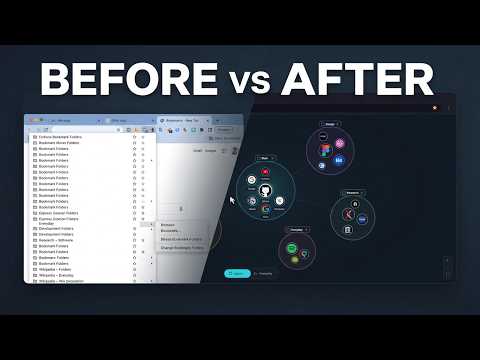
Replaces your new tab with an interactive graph of your bookmarks: folders as islands, sites as favicon dots. Fully local.
Turn your Chrome bookmarks into an interactive visual map. Organize folders, connect related sites, and find what you need at a glance. Folders become islands. Bookmarks appear as site icons within them. Explore your collection visually, find saved pages, and connect related resources with links. ORGANIZE YOUR BOOKMARKS • Explore nested folders as islands or expandable folder lists. • Search bookmarks, add notes and tags, and mark favorites. • Create links between related bookmarks and folders. • Adjust colors, node sizes and the graph layout. • Create, rename, move and delete your real Chrome bookmarks. KEYBOARD CONTROLS Use Ctrl/Cmd+X, C and V to cut, copy and paste bookmarks or complete folders. Ctrl/Cmd+Z undoes up to 20 recent actions in the current tab. Reloading or closing the tab clears its undo history. TRY THE DEMO FIRST The welcome screen includes a sandbox with sample bookmarks. Explore its folders, links and editing tools without changing your own collection. You can return to the introduction later. LOCAL BACKUPS A local bookmark snapshot is saved before bookmark write commands. You can export and import backup JSON files. Recovery creates a separate dated folder. Editing commands do change your actual Chrome bookmarks. PRIVACY Bookmark data, workspace settings, notes and backups are processed locally. The developer does not receive them. There is no account, analytics or advertising. Opening a bookmark through Orbit Marks updates its local opening count and last-opened time to control dot size and labels; the extension does not read your general browser history. Copy and Paste access the clipboard only after your command. Chrome's own sync settings remain under your control. Orbit Marks replaces the new tab page. Disable or remove the extension to restore Chrome's default page.
0 out of 5No ratings
Details
- Version0.15.1
- UpdatedNovember 11, 2026
- Offered byv.vyn_
- Size1.23MiB
- LanguagesEnglish
- Developer
Email
vova.vinog+orbitmarks@gmail.com - Non-traderThis developer has not identified itself as a trader. For consumers in the European Union, please note that consumer rights do not apply to contracts between you and this developer.
Privacy

Orbit Marks has disclosed the following information regarding the collection and usage of your data. More detailed information can be found in the developer's privacy policy.
Orbit Marks handles the following:
This developer declares that your data is
- Not being sold to third parties, outside of the approved use cases
- Not being used or transferred for purposes that are unrelated to the item's core functionality
- Not being used or transferred to determine creditworthiness or for lending purposes
Support
For help with questions, suggestions, or problems, please open this page on your desktop browser