

Optymatch: LinkedIn & Internshala Sourcing Extension
3 ratings
)
Overview
Source candidates & clients from LinkedIn and Internshala with the handy Optymatch Extension
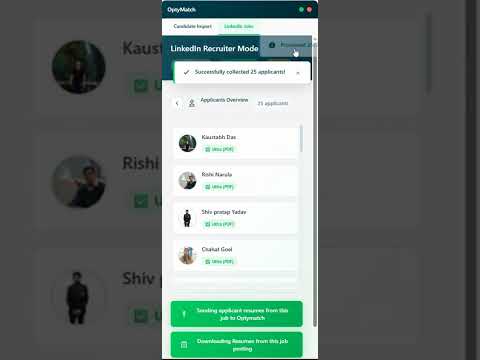
Bring top talent from LinkedIn directly into your Optymatch talent pool — effortlessly, securely, and in seconds. The Optymatch LinkedIn Sourcing Extension empowers recruiters, hiring managers, and talent acquisition professionals to streamline candidate imports from LinkedIn job posts into the Optymatch platform — saving hours of manual data entry and giving you a single, organized place to manage all your potential hires. 🚀 What This Extension Does The Optymatch LinkedIn Sourcing Extension is built to help recruiters move candidates seamlessly from LinkedIn to Optymatch.ai, the AI-powered recruitment platform that grades, filters, and manages resumes intelligently. It gives you two powerful sourcing modes: 1. Import Candidate Profiles (Individual Mode) Quickly and accurately capture candidate information from any LinkedIn profile page. Instead of manually copying details, you can import the candidate’s professional information directly into your Optymatch dashboard with one click. The extension intelligently reads and structures publicly available information such as: a) Candidate’s name, headline, and current position b) Experience history and education c) Skills and endorsements d) Contact and location details (if available on the profile) All this information is neatly formatted and saved into your Optymatch talent database, so your team can immediately start evaluating candidates using Optymatch’s built-in scoring, AI detection, and analytics tools. (Note: The extension only captures data made publicly visible by the user, respecting LinkedIn’s terms of use and privacy standards.) 2. Import All Applicants from Your Job Post (Bulk Mode) If you’ve posted a job on LinkedIn or Internshala and have multiple applicants, you can import them all into Optymatch in one go. With this feature, you can: a) Instantly bring all applicants from your LinkedIn job posting to your Optymatch dashboard b) Eliminate manual downloads or data entry — everything happens in a few clicks c) Automatically organize applicants by job title, source, and application date d) Centralize all your resumes for smarter AI-based evaluation inside Optymatch This is perfect for busy recruiters managing multiple roles and applicant lists. Instead of toggling between tabs and manually downloading each profile, Optymatch helps you build your complete, searchable talent pool in minutes. 💡 Why Recruiters Love This Extension - Save Hours of Manual Work: Move candidate data instantly from LinkedIn to Optymatch without repetitive copy-pasting. - Enhance Accuracy: Automatically structured candidate data ensures consistent formatting and cleaner analytics. - Build a Unified Talent Pool: Every LinkedIn lead or applicant lands in one central Optymatch dashboard — ready for grading, screening, and tracking. - AI-Powered Evaluation: Once imported, Optymatch’s intelligent engine grades resumes, detects AI-generated content, and highlights top-fit candidates for your open roles. - Seamless Integration: Works perfectly with your existing Optymatch account — no extra setup or training required. 🧠 About Optymatch Optymatch.ai is a next-generation recruitment software designed to make hiring faster, smarter, and more data-driven. It automatically extracts information from resumes, detects AI-written content, grades candidates based on multiple parameters, and provides a complete suite of applicant tracking tools — including interview scheduling, feedback tracking, bulk messaging, and candidate screening. With this Chrome extension, you extend Optymatch’s capabilities right into your LinkedIn workflow — allowing you to identify and import great candidates the moment you find them. ⚙️ How It Works Install the Extension Add Optymatch LinkedIn Sourcing Extension from the Chrome Web Store. Sign in to Your Optymatch Account Connect your account securely to start importing candidates. Go to a LinkedIn Profile or Job Post You’ll see the Optymatch extension button appear. Choose Your Mode: “Li Profile” for adding a single candidate. “Li Jobs” for adding all applicants from your job post. Review and Manage in Optymatch All imported candidates appear in your Optymatch dashboard, ready for screening, evaluation, and next steps. 🔒 Privacy & Compliance Optymatch respects user privacy and adheres to LinkedIn’s data use guidelines. The extension only captures data visible on the screen and does not store or transmit private or hidden information. All imports are encrypted and securely transmitted to your verified Optymatch account. We are committed to maintaining transparency and ensuring ethical use of publicly available data for legitimate recruitment purposes. 🧩 Who Should Use This Extension This tool is ideal for: 1) Recruiters and HR professionals sourcing candidates on LinkedIn 2) Founders, hiring managers, and agencies managing multiple roles and applicants 3) Talent acquisition teams looking to build centralized candidate pools without data entry Optymatch users who want to bring LinkedIn data directly into their AI-powered recruitment workflow 🧭 Key Highlights ✅ One-click import of individual LinkedIn profiles ✅ Bulk import of applicants from job posts ✅ Structured candidate data for analysis ✅ Fast, secure, and compliant ✅ Fully integrated with Optymatch.ai 💬 Example Use Case Imagine you’ve posted a job for “Sales Development Representative” on LinkedIn and received 80 applicants. Instead of manually downloading resumes or copy-pasting candidate info, just open your LinkedIn job post, click “Import All”, and all applicants are instantly added to your Optymatch dashboard — where the AI engine automatically grades them and flags the top candidates. Or, if you find a promising profile while browsing LinkedIn, you can simply click “Import Profile” and save that candidate to your Optymatch pool for later review. 🌟 Save Time. Hire Smarter. Source Effortlessly. The Optymatch LinkedIn Sourcing Extension helps you spend less time on repetitive tasks and more time engaging with the right candidates. Whether you’re sourcing one profile or hundreds of applicants, Optymatch ensures that every lead you find on LinkedIn is instantly organized, analyzed, and ready to move forward in your recruitment pipeline. Transform the way you source candidates on LinkedIn — start using the Optymatch LinkedIn Sourcing Extension today!
5 out of 53 ratings
Details
- Version1.1.11
- UpdatedJune 8, 2026
- Offered byOptymatch
- Size162KiB
- LanguagesEnglish
- Developer
Email
support@optymatch.com - Non-traderThis developer has not identified itself as a trader. For consumers in the European Union, please note that consumer rights do not apply to contracts between you and this developer.
Privacy

Optymatch: LinkedIn & Internshala Sourcing Extension has disclosed the following information regarding the collection and usage of your data. More detailed information can be found in the developer's privacy policy.
Optymatch: LinkedIn & Internshala Sourcing Extension handles the following:
This developer declares that your data is
- Not being sold to third parties, outside of the approved use cases
- Not being used or transferred for purposes that are unrelated to the item's core functionality
- Not being used or transferred to determine creditworthiness or for lending purposes
Support
For help with questions, suggestions, or problems, visit the developer's support site