


總覽
TradingView Parameter Optimizer as an extension
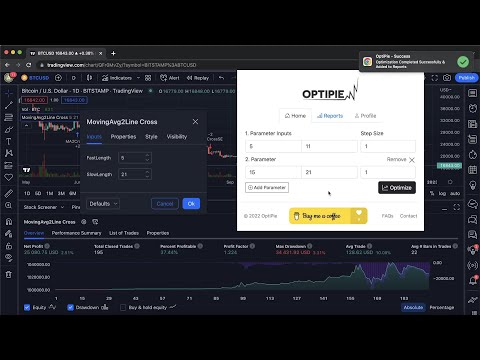
OptiPie is an open source strategy optimizer automation tool for TradingView. Easily optimize strategies, store optimization reports and make analysis via simple UI. Download as Chrome Extension Now! Quick Start: 1. Open TradingView and load a chart with a strategy applied. 2. Open the strategy's Settings window (click the gear icon on the strategy) 3. Click the OptiPie extension icon to open the popup 4. Configure your parameter ranges and click Optimize Features Optimize Strategies Up to 5 Parameters Optimize any TradingView Strategy you want up to 5 Parameters. Limitless Parameter Input Range Unless your Internet or TradingView is broken, you can optimize with any input range you want. Find, Sort, View & Analyze Reports Easily find your report in Reports tab with table search and sorts. Open report detail view to make a deep analysis. Reports Stored ⚙️ All optimization reports are saved locally thus can be viewed or deleted any time within 'Reports' tab. Last Entered Parameter Inputs Stored In State During your Chrome Session, last entered parameter inputs are per unique strategy - switch strategies freely. OptiPie Plus, The Ultimate Input Optimizer 📢 Join the OptiPie Plus Membership, discover amazing features, go beyond the limits! - Multi-Timeframe Optimization - Selectable Parameters - Stoppable Optimization with Partial Report - Extended Report Data - Optimize Strategies Up to 20 Parameters Try now! https://buymeacoffee.com/optipieapp/membership Latest Updates 📢 (v1.5.1) New Feature: Save & Restore Your Optimizations! No more re-entering parameters - switch strategies freely. • Try Last Used Parameters: Enable in Settings to automatically carry over parameters when running the same strategy across different symbols or intervals. • Auto-save per strategy: OptiPie remembers your optimization parameters per strategy, symbol, and interval. • Reset Parameters button to clear inputs and start fresh. • Saved configs are automatically cleaned up after 30, 60, or 90 days — configurable in Settings. Checkout news for the latest updates here! optipie.app/news Visit optipie.app for more!
3.8 分 (滿分 5 分)40 個評分
詳細資料
隱私權

「OptiPie TradingView Optimizer」已揭露下列關於收集及使用資料的資訊。 如需更多詳細資訊,請參閱開發人員的《privacy policy》。
OptiPie TradingView Optimizer 會處理下列資料:
這位開發者就你的資料做出下列聲明:
- 除經核准的用途外,不會將你的資料販售給第三方
- 不會基於與商品核心功能無關的目的,使用或轉移資料
- 不會為了確認信用度或基於貸款目的,使用或轉移資料
支援
如有疑問或建議,請前往開發人員的支援網站