

Tab Triage

Overview
Group, sort and bulk-close tabs. Knows when your PRs merged.
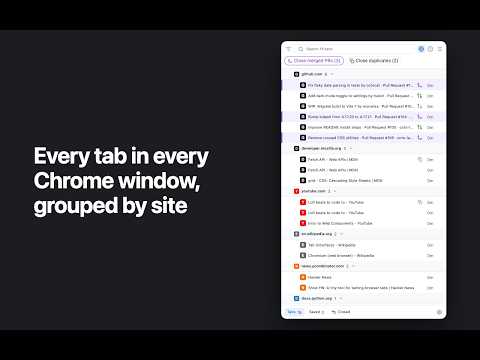
Too many tabs? Tab Triage puts every open tab, from every Chrome window, in one side panel, grouped by site. See what you have open and close the tabs you are done with. Tabs from all your Chrome windows in one list. Group by site or by last viewed, and search them all. Select with click, Shift-click or Cmd-click, then close in one go. Tabs of GitHub pull requests show the PR’s state: open, draft or merged. One click closes the tabs of merged PRs. Tab Triage only manages your tabs; it never changes anything on GitHub. One click closes duplicate tabs. Filter by what a page shows, on any site. Point at an element, like a CRM status that reads “Open sale lead”, and find every open tab in that state. Filter tabs by site, URL, title or days not viewed. Pin a filter to keep it as a button. Save tabs for later. Optional rules close stale tabs for you. Cmd-Z reopens the tabs you just closed. Open it with the toolbar icon or Alt+Shift+T. Private by design: no servers, no analytics. Everything stays in your browser. Open source (MIT): https://github.com/rebar-code/tab-triage
0 out of 5No ratings
Details
- Version0.1.0
- UpdatedOctober 29, 2026
- Offered byRebar
- Size252KiB
- LanguagesEnglish
- Developer
Email
info@rebar.is - Non-traderThis developer has not identified itself as a trader. For consumers in the European Union, please note that consumer rights do not apply to contracts between you and this developer.
Privacy

This developer declares that your data is
- Not being sold to third parties, outside of the approved use cases
- Not being used or transferred for purposes that are unrelated to the item's core functionality
- Not being used or transferred to determine creditworthiness or for lending purposes
Support
For help with questions, suggestions, or problems, visit the developer's support site