


Overview
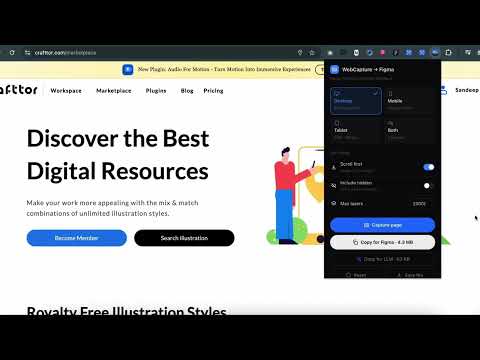
Turn any website into editable Figma layers — desktop, tablet & mobile — with real fonts, images, hover states and animations.
WebCapture turns any website into fully editable Figma layers — not a screenshot, not a flattened image, but real layers with real type, real colors, and the page's actual layout. WHY IT'S DIFFERENT Most website-to-Figma tools stop at static layout. WebCapture also captures what the page DOES: • Hover states — the exact color, shadow and transform change a button undergoes on hover, recorded on the layer • CSS animations — @keyframes captured in full, not just referenced by name • Scroll reveals — AOS, WOW.js, Framer Motion and similar reveal-on-scroll libraries detected and recorded • Sticky & fixed elements — headers and CTAs that stay pinned while scrolling import as sticky Figma layers that behave the same way in prototypes • Real links — page links and in-page anchors become working Figma prototype connections HOW IT WORKS 1. Open the page you want to capture and click the WebCapture icon 2. Choose Desktop, Mobile (6 real phone widths, 360–430px), Tablet (4 sizes), or Desktop + Mobile together 3. Click Capture — the page is read exactly as the browser renders it: computed styles, resolved fonts, real image formats, lazy-loaded content forced to load first 4. Copy the result and paste it into the companion "WebCapture to Figma" plugin — or fetch a URL directly inside the plugin without installing this extension at all WHAT GETS CAPTURED • Full layout, positioned exactly as the browser laid it out • Real type — resolved font family, size, weight, line height and letter spacing, with fallback resolution for variable fonts (a page's "Quicksand Variable" still becomes usable Quicksand instead of silently falling back to a generic font) • Images — PNG, JPEG, GIF, WebP and AVIF, auto-converted to formats Figma can import • Colors, gradients, shadows, borders and corner radii, exactly as rendered • Inline SVGs, with computed color baked in — so icons keep their real colors instead of importing as black silhouettes ALSO INCLUDED: COPY FOR LLM Every capture can also be copied as a compact, structured summary — layout, type, color palette, and every interaction — ready to paste into Claude, ChatGPT or any LLM to rebuild, redesign or critique the page. PERMISSIONS, EXPLAINED • Read/scripting access to the current page — needed to read its rendered layout and inject the capture engine • Debugger — used only for Mobile/Tablet device emulation (viewport, user agent, touch); Chrome does not expose device emulation without it • Downloads — used only if you choose "Save file" for a very large capture PRIVACY Nothing is uploaded anywhere by default. A capture stays in your browser until you choose to copy it to your clipboard or save it to a file. Pages behind a login are captured directly from your own signed-in tab, so nothing is ever sent to a third-party server to reach them.
0 out of 5No ratings
Details
- Version1.35.13
- UpdatedOctober 25, 2026
- Size108KiB
- LanguagesEnglish
- DeveloperCrafttor.comWebsite
B-1315, First Floor, Green Field, FBD, HR-121009 Faridabad, Haryana 121009 INEmail
plugin@crafttor.comPhone
+91 99718 91479 - TraderThis developer has identified itself as a trader per the definition from the European Union and committed to only offer products or services that comply with EU laws.
- D-U-N-S642901803
Privacy

WebCapture to Figma has disclosed the following information regarding the collection and usage of your data. More detailed information can be found in the developer's privacy policy.
WebCapture to Figma handles the following:
This developer declares that your data is
- Not being sold to third parties, outside of the approved use cases
- Not being used or transferred for purposes that are unrelated to the item's core functionality
- Not being used or transferred to determine creditworthiness or for lending purposes
Support
For help with questions, suggestions, or problems, visit the developer's support site