


Overview
Record your screen, tab or webcam with audio, then share a link the moment you stop. No account needed to watch it.
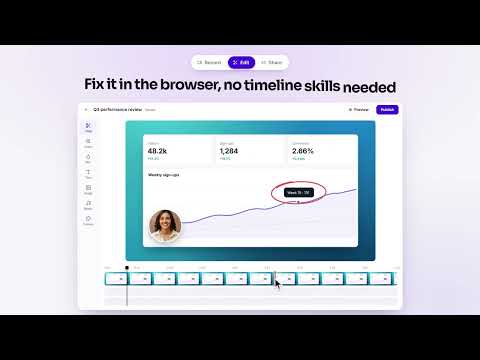
Opivv records your screen and camera and gives you a share link the moment you stop. Explain a bug, review a design, walk a client through a proposal or answer a question without booking a meeting. RECORD • A tab, a window, your whole screen or just an area of it • Your camera in a bubble you can move around the page, with background blur • Microphone and tab audio • A floating toolbar to pause, restart, draw on the screen or stop • A countdown and click highlights, so viewers can follow along • Camera only, when you just want to talk to someone SHARE • Your link is ready as soon as you stop recording • Anyone with the link can watch in the browser, no account or download needed • See views, average watch time and the moment people stop watching • Viewers comment at the exact second, and you can reply with a video SCREENSHOTS • Capture the visible page, an area or the full scrolling page • Mark it up and share it with a link EDIT (Pro) • Trim, cut, zoom and blur in the browser editor • The link you already shared plays the new version PRO AND TEAM • Recordings up to 2 hours (4 hours on Team), up to 1080p • Transcripts and summaries (in English) • Password protection, link expiry, and an email gate that shows you who watched • Your own logo and colours on the share page • Save recordings to your computer instead of uploading them • Shared team workspaces (Team) FREE PLAN • Recordings up to 5 minutes in 720p • Share pages show a small "Made with Opivv" badge next to the player. Your video itself is never watermarked. PRIVACY Opivv only records what you choose, and only after you press Start. It does not read or collect the pages you browse. Recordings go to your own Opivv account. Privacy policy: https://opivv.com/privacy Questions? info@opivv.com Opivv was called ClipCast until October 2026. Your account and recordings carry over.
5 out of 52 ratings
Details
- Version1.7.0
- UpdatedOctober 10, 2026
- FeaturesOffers in-app purchases
- Size4.07MiB
- LanguagesEnglish
- DeveloperWebsite
Email
info@clipcast.tech - Non-traderThis developer has not identified itself as a trader. For consumers in the European Union, please note that consumer rights do not apply to contracts between you and this developer.
Privacy

Opivv – Screen Recorder with Webcam & Share Links has disclosed the following information regarding the collection and usage of your data. More detailed information can be found in the developer's privacy policy.
Opivv – Screen Recorder with Webcam & Share Links handles the following:
This developer declares that your data is
- Not being sold to third parties, outside of the approved use cases
- Not being used or transferred for purposes that are unrelated to the item's core functionality
- Not being used or transferred to determine creditworthiness or for lending purposes
Support
For help with questions, suggestions, or problems, visit the developer's support site