


Overview
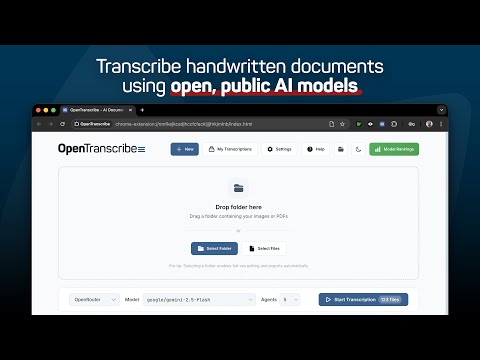
Transcribe historical handwritten documents using local and open public AI models!
**Transcribe handwritten documents, and search the scanned PDFs you already have** OpenTranscribe is a free browser extension for genealogists, historians, and researchers working through large collections of historical documents. It handles both halves of the problem. Drop in a folder of scans and it transcribes the handwriting using the AI model you choose. Point it at a folder of PDFs that already carry OCR text and it searches every one of them, then fixes the words the scanner misread. **Transcribe handwritten scans** • Choose from 100+ AI models through OpenRouter, Google Gemini, OpenAI, or Anthropic, ranked to help you pick one. • Or run a model on your own computer, with one-click setup for Ollama, LM Studio, llama.cpp, and vLLM. • Click Smart Adjust to crop, straighten, and fix the contrast of your images, so the model can read them. • Drag in whole folders and transcribe thousands of images in a single batch, several pages at a time. • Correct or reprocess any page in the built-in editor, with the original image beside the text. • Run one page through a second model and compare the two versions side by side. • Export to PDF with or without the source images, plain text, CSV, or XML. **Search and clean the PDFs you already have** The Library works with PDFs that already contain OCR text: scanned newspapers, parish registers, record books, anything a scanner or archive has already read. • Register a folder and your files stay where they are. Nothing is copied, moved, or renamed. • Search thousands of files at once and land on the page with the word highlighted. • Add a tilde to catch what the scanner got wrong. Maloney~ finds Maioney and Ma1oney, and joins words broken across a line break. • Send a bad page to an AI model to have the OCR rewritten. The corrected text is searchable from your next query. • Clean hundreds of pages in one run under a spending cap, $1.00 USD by default, which you can raise or lower. • Clip an article that runs across several columns and save the pieces as one image. • Write the corrected text back into the PDF as an invisible layer, with an automatic backup, so your desktop search can find it too. OpenTranscribe is free and cheap to run. Transcribe hundreds of pages for under a dollar (USD) with an accurate, inexpensive model like Gemini 3.1 Flash, and edit the prompts and parameters it runs with. **OpenTranscribe is designed for:** • Genealogists transcribing historical documents. • Historians working with archival collections. • Researchers processing large document sets. • Anyone with handwritten documents they need to read. **Getting started** To transcribe scans: 1. Choose a folder of images and pick a model. 2. Optionally run Smart Adjust over them first. 3. Click "Start Transcription" and watch the results arrive. 4. Search, edit, and export. To search PDFs you already have: 1. Open the Library and click "Add folder". 2. Type a search and press Enter. 3. Click a result to open that page at the match. **What file formats are supported?** Transcribe: JPG, PNG, and PDF files. Multi-page PDFs are split into individual pages. Library: PDFs that already contain OCR text. Scans with no text in them go through transcription instead. Export: PDFs (with or without images), merged or individual TXT files, CSV, and XML. **How much does it cost?** The extension is free, and models you run on your own computer cost nothing to use. Built-in options like Google's Gemini 3.1 Flash transcribe 100 images accurately for less than 25 cents (USD). OpenTranscribe needs an API key from whichever provider you choose, and you pay that provider directly for what you use. See our model recommendations and benchmark rankings at https://genea.ca/rankings **Is OpenTranscribe secure?** Yes. OpenTranscribe runs entirely on your computer. Your documents and API keys never leave your machine except when they go to the AI provider you picked. Transcription batches are saved as ordinary files in your working directory. Library folders are read where they sit, and the page text used for searching is cached in a folder inside them. You control where all of this lives, and you can back it up, move it, or delete it whenever you like. OpenTranscribe does not collect, store, or have access to your documents, transcriptions, or API keys. **We are here to help!** • Click "Help" at the top of any page for guides covering every feature, with search across all of them. • Found a bug? Click "Report a bug" on the Help page. • Send support or feedback to hello@genea.ca Latest update: Thursday August 27th, 2026 v0.3.6: Added colour coded dots to groups functionality, persistence improvements. Privacy Policy: https://www.genea.ca/opentranscribe-privacy/
0 out of 5No ratings
Details
- Version0.3.6
- UpdatedAugust 28, 2026
- Size2.82MiB
- LanguagesEnglish
- DeveloperGenea ResearchWebsite
11 Princess St E Waterloo, ON N2J 2H4 CAEmail
hello@genea.caPhone
+1 519-704-1222 - TraderThis developer has identified itself as a trader per the definition from the European Union and committed to only offer products or services that comply with EU laws.
Privacy

This developer declares that your data is
- Not being sold to third parties, outside of the approved use cases
- Not being used or transferred for purposes that are unrelated to the item's core functionality
- Not being used or transferred to determine creditworthiness or for lending purposes
Support
For help with questions, suggestions, or problems, please open this page on your desktop browser