


Overview
Open links in your browser from Zapier, n8n, Make, or any webhook-capable tool.
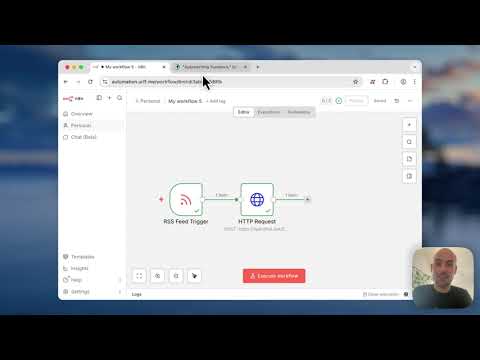
Open links directly in your browser from any automation tool—Zapier, n8n, Make, or anything that can send a webhook. HOW IT WORKS 1. Install the extension 2. Copy your unique webhook URL from the pop-up 3. Send links to it from your favorite automation tool 4. Links open automatically in your local Chrome That's it. No sign-up. No account. No configuration required. PERFECT FOR • Never late to meetings: Open your Google Meet or Zoom link a minute before it starts • Opening Google Docs, Sheets, or any link from workflow automations • New CRM leads: Open new profiles automatically so you can follow up while they're still warm • Escalated support tickets: Open them the moment they're assigned to you • Pull request reviews: Open PRs assigned to you or from specific repos the moment they're created • RSS to browser: Open new articles from your favorite blogs as they publish • Real estate listings: Open new Zillow or Redfin matches as they hit the market PRIVACY FIRST • No sign-up or account required, ever! • Stores only your unique webhook URL locally. • No analytics, no tracking, no data collection. • Works with self-hosted servers if you want full control OPEN SOURCE Fully open source. Inspect the code, host it yourself (if you prefer), or contribute. https://github.com/tobyurff/openthatlink SIMPLE & LIGHTWEIGHT • Works in seconds after install • Checks for new links every 30 seconds while your browser is open, and stores queued links for up to two days while your browser is closed.
0 out of 5No ratings
Details
- Version1.0.1
- UpdatedJanuary 14, 2026
- Size60.17KiB
- LanguagesEnglish
- DeveloperWebsite
Email
toby-openthatlink-support@unstuckable.eu - Non-traderThis developer has not identified itself as a trader. For consumers in the European Union, please note that consumer rights do not apply to contracts between you and this developer.
Privacy

This developer declares that your data is
- Not being sold to third parties, outside of the approved use cases
- Not being used or transferred for purposes that are unrelated to the item's core functionality
- Not being used or transferred to determine creditworthiness or for lending purposes