

OpenSidebar
1 rating
)
Overview
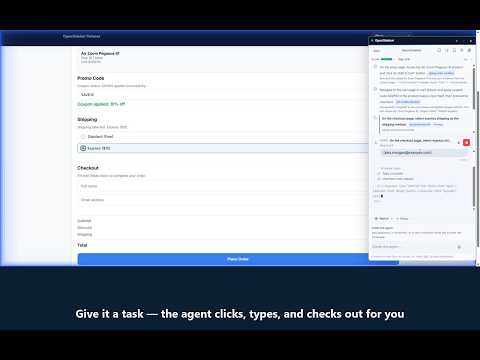
Open-source AI browser agent. Navigate, click, type, and automate web tasks from a side panel with your own provider key.
Describe the result you want and OpenSidebar works through the browser task from your Chrome side panel. It can click, type, scroll, read information across pages, complete multi-step forms, and watch a page for changes. You see the work as it happens and can pause or stop it at any time. WHAT IT CAN DO - Complete multi-step tasks such as forms, checkouts, and cross-page research - Read information on one page and use it on another - Work from both the live screenshot and page structure - Manage tabs and windows, upload and download files, and extract structured data - Plan harder tasks step by step and verify the result - Watch a page and tell you when something changes YOU STAY IN CONTROL - Choose how often OpenSidebar asks before acting - Require approval for consequential actions - Review the agent's progress and guide, pause, or stop it - Keep drafts unsent and purchases unconfirmed until you approve BRING YOUR OWN KEY - Use OpenRouter (recommended and default) or Fireworks - Choose Local mode, where your key stays in Chrome and requests go directly to your provider - Or explicitly enable OpenSidebar Cloud, where your verified key is KMS-encrypted and a non-retaining relay streams requests to your provider - Cloud mode is account-linked, revocable, quota-limited, and never returns the provider key to the extension - Relay prompts, page content, screenshots, and responses are processed transiently and are not retained by OpenSidebar - Optional reliability summaries stay local in Chrome, are off by default, and can be inspected and cleared - Optional local memory: a personal profile you review yourself, with sensitive fields consent-gated and encrypted SAFETY NOTES Browser AI can still make mistakes or misread page state. Start with trusted sites, review sensitive actions, and use the approval settings for anything consequential. OpenSidebar is free and open source under the MIT licence. Source code: https://github.com/krisshkodrani/OpenSidebar
5 out of 51 rating
Details
- Version0.7.2
- UpdatedAugust 10, 2026
- Size1.13MiB
- LanguagesEnglish
- Developer
Email
kshkodrani@gmail.com - Non-traderThis developer has not identified itself as a trader. For consumers in the European Union, please note that consumer rights do not apply to contracts between you and this developer.
Privacy

OpenSidebar has disclosed the following information regarding the collection and usage of your data. More detailed information can be found in the developer's privacy policy.
OpenSidebar handles the following:
This developer declares that your data is
- Not being sold to third parties, outside of the approved use cases
- Not being used or transferred for purposes that are unrelated to the item's core functionality
- Not being used or transferred to determine creditworthiness or for lending purposes
Support
For help with questions, suggestions, or problems, visit the developer's support site