


Overview
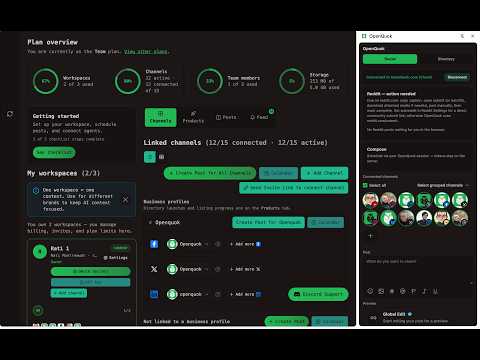
Schedule posts from a Chrome side panel. Right-click drafts, Skool connect, Reddit handoff, directory autofill for OpenQuok.
OpenQuok is a Chrome extension for customers who use OpenQuok on the web. Open the side panel to schedule posts or save drafts. Use the right-click menu to send text, links, or images into the composer. Connect session-based channels in the browser. Get help on Reddit submit pages. Autofill supported product-directory launch forms. WHY USE IT You read in one tab. Many tools open a second dashboard. You paste and lose your place. OpenQuok keeps a composer in the side panel so you stay on the page you use. REQUIREMENTS • An OpenQuok account at https://www.openquok.com, or your self-hosted OpenQuok URL. • At least one channel connected in the dashboard (Add Channel). • This extension in the same Chrome profile. SIDE PANEL — SOCIAL 1. Pin OpenQuok on the toolbar and open the side panel. 2. Link your dashboard session. Keep a signed-in OpenQuok tab open on the same site. 3. Select channels you already connected (avatar chips). 4. Write a caption. Add images or video (up to 10 files per post). 5. Choose Publish now, Schedule, or Draft. Scheduling and server publish use the channels you connected in OpenQuok. The extension does not add new networks by itself. For the media library, per-network media, or very large uploads, use Open full composer in the dashboard. RIGHT-CLICK DRAFTS On any site: • Selected text → Schedule with OpenQuok (text goes to the composer). • Page background → page title and URL in the draft. • Image → attach when the URL can be fetched. The side panel opens on Social. The draft merges into the composer. SKOOL CONNECT Some communities use a browser session instead of OAuth in OpenQuok. 1. Stay signed in on skool.com in this Chrome profile. 2. In OpenQuok, use Add Channel and choose Skool. 3. Approve access when the extension asks. OpenQuok stores an encrypted session for scheduling. Your Skool password is not sent to OpenQuok. REDDIT Reddit is a handoff flow, not automatic posting from our servers. 1. Connect Reddit in the dashboard. 2. Schedule with your subreddit settings. 3. When the slot is due, OpenQuok asks you to act in the browser. 4. The extension can open the submit page and help autofill. You click Post on Reddit. Stay signed in to Reddit in this Chrome profile. DIRECTORY LAUNCH 1. Create a product profile in OpenQuok (My Products). 2. Start launch to a directory OpenQuok supports (such as PeerPush or Uneed). 3. The extension opens the site and fills mapped fields from your profile. 4. Use the Directory tab in the side panel for Fill on the active tab. 5. You review and submit on the directory site. WHO IT IS FOR • People who schedule social content while they browse. • Teams that launch products to directories often. • Reddit users who plan in OpenQuok and publish on reddit.com themselves. DATA AND PRIVACY • Posts and uploads go to your OpenQuok API only (your dashboard origin). • Session reads for connect happen only when you start connect or refresh, with your approval. • Directory autofill uses data from your OpenQuok profile handoff. • Reddit helpers run only on submit pages you open. • The extension does not scan unrelated sites. It runs on OpenQuok dashboard pages, supported directory hosts, and Reddit submit pages you use. Privacy policy: https://www.openquok.com/privacy-policy HELP Install checklist: https://www.openquok.com/docs/installation/chrome-extension Overview: https://www.openquok.com/browser-extension Connect channels: https://www.openquok.com/docs/channels/connect The full calendar, analytics, teams, and agents are in the web app. This extension is the quick path from any tab.
0 out of 5No ratings
Details
- Version0.1.18
- UpdatedNovember 2, 2026
- Size353KiB
- LanguagesEnglish (United States)
- Developer
- TraderThis developer has identified itself as a trader per the definition from the European Union and committed to only offer products or services that comply with EU laws.
Privacy

OpenQuok: Social Media Scheduler & Directory Autofill has disclosed the following information regarding the collection and usage of your data. More detailed information can be found in the developer's privacy policy.
OpenQuok: Social Media Scheduler & Directory Autofill handles the following:
This developer declares that your data is
- Not being sold to third parties, outside of the approved use cases
- Not being used or transferred for purposes that are unrelated to the item's core functionality
- Not being used or transferred to determine creditworthiness or for lending purposes
Support
For help with questions, suggestions, or problems, visit the developer's support site