Item logo image for OpenBlur

OpenBlur

kalman.co.il
5.0(

2 ratings

)
Item media 6 (screenshot) for OpenBlur
Item video thumbnail
Item media 2 (screenshot) for OpenBlur
Item media 3 (screenshot) for OpenBlur
Item media 4 (screenshot) for OpenBlur
Item media 5 (screenshot) for OpenBlur
Item media 6 (screenshot) for OpenBlur
Item video thumbnail
Item media 2 (screenshot) for OpenBlur
Item media 3 (screenshot) for OpenBlur
Item media 4 (screenshot) for OpenBlur
Item media 5 (screenshot) for OpenBlur
Item media 6 (screenshot) for OpenBlur

Overview

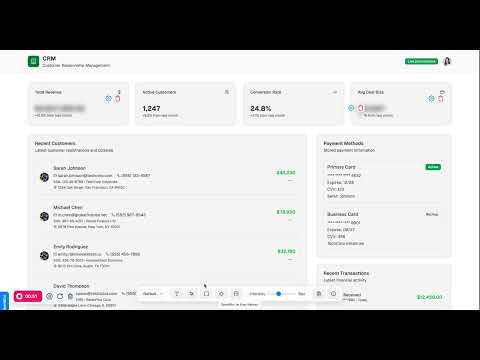
A modern extension to blur or hide elements on any webpage.

OpenBlur is a simple, powerful tool for protecting your privacy on any webpage. Whether you're screen-sharing, taking screenshots, or just want to hide distractions, OpenBlur gives you precise control over what you want to conceal. OpenBlur is designed with your privacy in mind. It operates entirely within your browser and does not collect, store, or transmit any of your personal data or browsing activity. OpenBlur is provided free of charge for personal, non-commercial use only. Commercial use is permitted, if installed via the Chrome Web Store (ID: kpjkckincceldjimnjliafdmgemoiiap) or if provided with a license grant.

Details

  • Version
    1.4
  • Updated
    September 15, 2025
  • Size
    56.24KiB
  • Languages
    English
  • Developer
    KSEC
    Website
    Email
    k53c@pm.me
  • Non-trader
    This developer has not identified itself as a trader. For consumers in the European Union, please note that consumer rights do not apply to contracts between you and this developer.

Privacy

The developer has disclosed that it will not collect or use your data.

This developer declares that your data is

  • Not being sold to third parties, outside of the approved use cases
  • Not being used or transferred for purposes that are unrelated to the item's core functionality
  • Not being used or transferred to determine creditworthiness or for lending purposes

Support

Related

Hidden Eye

3.0

hide/view HTML elements on a web page.

Picture-in-Picture Anything - Place Any Element on Top of your screen

4.4

An extension that allows you to use Picture-in-Picture mode on any element of any website.

Image Blur Extension

5.0

A Chrome extension to blur images on web pages

OpenBlur

5.0

Hide and blur sensitive information on any webpage. Blur your secrets such as personal emails, public IP addresses, and more.

Incognito This Tab For Chrome

5.0

Open current tab in an Chrome incognito Mode. Press Alt+O Chrome hidden mode

Content Edit & Blur

4.6

Easily edit, replace or blur elements on any webpage

Privacy Overlay for Public Browsing

5.0

Adds a privacy overlay and a panic button to protect your screen content.

BlockAid: Website Blocker

5.0

Block distracting websites and boost your productivity. Add domains and block current pages all in one easy-to-use Chrome extension.

BlurGuard

5.0

Selectively blur text, areas, and elements on any webpage

Easy Blur

5.0

Blur parts of a web page, before taking screenshots or screen recordings

Incognito mode for Chrome

5.0

Incognito mode for Chrome extension opens current tab in an incognito mode

Blur Page

1.0

Hide sensitive information on page

Hidden Eye

3.0

hide/view HTML elements on a web page.

Picture-in-Picture Anything - Place Any Element on Top of your screen

4.4

An extension that allows you to use Picture-in-Picture mode on any element of any website.

Image Blur Extension

5.0

A Chrome extension to blur images on web pages

OpenBlur

5.0

Hide and blur sensitive information on any webpage. Blur your secrets such as personal emails, public IP addresses, and more.

Incognito This Tab For Chrome

5.0

Open current tab in an Chrome incognito Mode. Press Alt+O Chrome hidden mode

Content Edit & Blur

4.6

Easily edit, replace or blur elements on any webpage

Privacy Overlay for Public Browsing

5.0

Adds a privacy overlay and a panic button to protect your screen content.

BlockAid: Website Blocker

5.0

Block distracting websites and boost your productivity. Add domains and block current pages all in one easy-to-use Chrome extension.

Google apps