

Open in VLC™ media player
863 rating
)
Ringkasan
Send audio and video streams directly to the well-known VLC™ media player
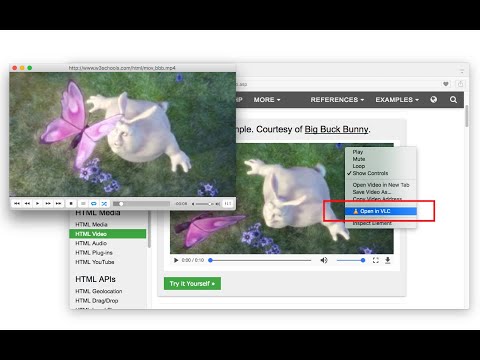
Open in VLC™ media player extension, sends video and audio links to the well-known VLC media player. This way you can directly watch online streams in the VLC media player with just one click. To send these links to the VLC media player, right-click over the video or audio link and use the context menu item or use the browser action button. If the extension only grabs a single link, the link is opened in the player. If multiple links are detected, you will get a prompt box to select media links to be sent to the player. Note: For this extension to work, you will need to install a minimal native-client application. Instruction on how to install the native client will be displayed once the extension is used. You can also watch installation instruction on the FAQs page How to use this extension: 1. The extension appends a context menu item to the browser context menu when the media element is the target. 2. The toolbar icon becomes active (colorful) when a page is supported As of version 0.2.0, there is a tool to join media files in a single media file. You can find this tool on the right-click context menu over the page action button. The output format of this tool is WAV. You can use VLC to convert this WAV file to any other audio format. --- Legal VLC is a trademark of the VideoLAN organization. This extension is an independent project and has no relationship to the VLC team or VideoLAN organization.
3,9 dari 5863 rating
Detail
- Versi0.4.3
- Diupdate16 Januari 2025
- Ditawarkan olehyokris.dev
- Ukuran102KiB
- Bahasa14 bahasa
- Developer
Email
yokris.dev@gmail.com - Non-pedagangDeveloper ini tidak mengidentifikasi diri sebagai pedagang. Bagi konsumen di Uni Eropa, perlu diperhatikan bahwa hak konsumen tidak berlaku untuk kontrak antara Anda dan developer ini.
Privasi

Developer ini menyatakan bahwa data Anda
- Tidak dijual ke pihak ketiga, di luar kasus penggunaan yang disetujui
- Tidak digunakan atau ditransfer untuk tujuan yang tidak terkait dengan fungsi inti item
- Tidak digunakan atau ditransfer untuk menentukan kelayakan kredit atau untuk tujuan pinjaman
Dukungan
Untuk mendapatkan bantuan terkait pertanyaan, saran, atau masalah, kunjungi situs dukungan developer