

Open in VLC™ media player
863 rating
)
Pangkalahatang-ideya
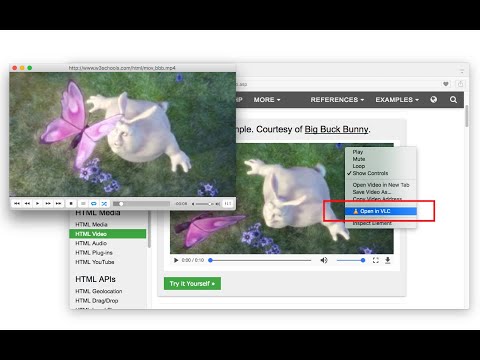
Send audio and video streams directly to the well-known VLC™ media player
Open in VLC™ media player extension, sends video and audio links to the well-known VLC media player. This way you can directly watch online streams in the VLC media player with just one click. To send these links to the VLC media player, right-click over the video or audio link and use the context menu item or use the browser action button. If the extension only grabs a single link, the link is opened in the player. If multiple links are detected, you will get a prompt box to select media links to be sent to the player. Note: For this extension to work, you will need to install a minimal native-client application. Instruction on how to install the native client will be displayed once the extension is used. You can also watch installation instruction on the FAQs page How to use this extension: 1. The extension appends a context menu item to the browser context menu when the media element is the target. 2. The toolbar icon becomes active (colorful) when a page is supported As of version 0.2.0, there is a tool to join media files in a single media file. You can find this tool on the right-click context menu over the page action button. The output format of this tool is WAV. You can use VLC to convert this WAV file to any other audio format. --- Legal VLC is a trademark of the VideoLAN organization. This extension is an independent project and has no relationship to the VLC team or VideoLAN organization.
3.9 sa 5863 rating
Mga Detalye
- Bersyon0.4.3
- Na-updateEnero 16, 2025
- Iniaalok ngyokris.dev
- Laki102KiB
- Mga Wika14 (na) wika
- Developer
Email
yokris.dev@gmail.com - Hindi traderHindi tinukoy ng developer na ito ang sarili bilang trader. Para sa mga consumer sa European Union, pakitandaang hindi naaangkop ang mga karapatan ng consumer sa mga kontrata sa pagitan mo at ng developer na ito.
Privacy

Ipinapahayag ng developer na ito na ang iyong data ay
- Hindi ibinebenta sa mga third party na hindi kabilang sa mga naaprubahang sitwasyon ng paggamit
- Hindi ginagamit o inililipat para sa mga layuning hindi nauugnay sa pangunahing functionality ng item
- Hindi ginagamit o inililipat para tukuyin ang pagiging creditworthy o para sa mga layunin ng pagpapautang
Suporta
Para sa tulong sa mga tanong, suhestyon, o problema, bisitahin ang site ng suporta ng developer