

Open in VLC™ media player
863 calificaciones
)
Descripción general
Send audio and video streams directly to the well-known VLC™ media player
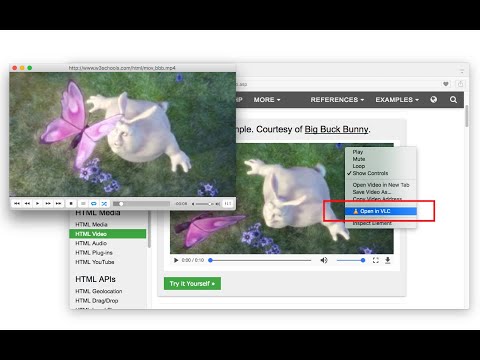
Open in VLC™ media player extension, sends video and audio links to the well-known VLC media player. This way you can directly watch online streams in the VLC media player with just one click. To send these links to the VLC media player, right-click over the video or audio link and use the context menu item or use the browser action button. If the extension only grabs a single link, the link is opened in the player. If multiple links are detected, you will get a prompt box to select media links to be sent to the player. Note: For this extension to work, you will need to install a minimal native-client application. Instruction on how to install the native client will be displayed once the extension is used. You can also watch installation instruction on the FAQs page How to use this extension: 1. The extension appends a context menu item to the browser context menu when the media element is the target. 2. The toolbar icon becomes active (colorful) when a page is supported As of version 0.2.0, there is a tool to join media files in a single media file. You can find this tool on the right-click context menu over the page action button. The output format of this tool is WAV. You can use VLC to convert this WAV file to any other audio format. --- Legal VLC is a trademark of the VideoLAN organization. This extension is an independent project and has no relationship to the VLC team or VideoLAN organization.
3.9 de 5863 calificaciones
Detalles
- Versión0.4.3
- Fecha de actualización16 de enero de 2025
- Ofrecido poryokris.dev
- Tamaño102KiB
- Idiomas14 idiomas
- Desarrollador
Correo electrónico
yokris.dev@gmail.com - No comercianteEl desarrollador no se identificó como comerciante. Si eres un consumidor de la Unión Europea, ten en cuenta que los derechos de los consumidores no aplican a los contratos entre el desarrollador y tú.
Privacidad

Este desarrollador declara el siguiente tratamiento de tus datos:
- No se venden a terceros, excepto en los casos de uso aprobados
- No se utilizan ni transfieren para fines no relacionados con la funcionalidad principal del elemento
- No se utilizan ni transfieren para determinar tu solvencia ni ofrecer préstamos
Asistencia
Si tienes preguntas, sugerencias o problemas, visita el sitio de asistencia del desarrollador