


總覽
Send PDF links directly to your favorite PDF viewer like Adobe Acrobat Reader
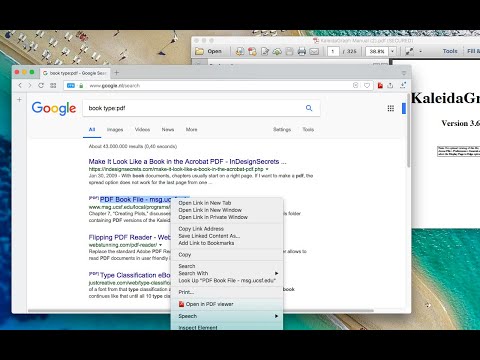
The "Open in PDF viewer" extension opens PDF files directly in your favorite external PDF viewer application. To use the extension, right-click on a PDF link and select the "Open in PDF viewer" item. The extension downloads the PDF file in your default downloads directory and then executes the external command to open the downloaded file with the default PDF viewer (e.g. Adobe Acrobat Reader or FoxIt PDF reader). Note that to execute an OS-level command, you need to install a native client. Native client installation guide appears on the first usage. Features: 1. Open PDF files from right-click context menu 2. Transfer already opened PDF files to the external PDF viewer by pressing the browser's action button 3. Detect PDF links and open them with left-click 4. Open the external PDF viewer with a user-defined delay 5. Supports most common PDF viewers Change Logs: 0.1.1: It is now possible to define left-click open in default PDF reader from the options page. If this mode is enabled, the extension blocks the default action when a link with the PDF mime type is the target. 0.1.2: It is possible to ask the extension to send the PDF URL to the external executable. Make sure your PDF Reader can open remote URLs before enabling this option 0.1.9: You can now run the external executable with a delay. This helps your antivirus application to validate the PDF file before this extension opens it with the external PDF viewer.
3.5 分 (滿分 5 分)50 個評分
詳細資料
- 版本0.3.7
- 已更新2025年11月18日
- 提供者rynu.smith
- 大小53.63KiB
- 語言English
- 開發人員
電子郵件
rynu.smith@gmail.com - 非交易商這位開發人員並未表明自己是交易商。歐盟地區的消費者請注意,消費者權利不適用於你和這位開發人員之間簽訂的合約。
隱私權
這位開發者就你的資料做出下列聲明:
- 除經核准的用途外,不會將你的資料販售給第三方
- 不會基於與商品核心功能無關的目的,使用或轉移資料
- 不會為了確認信用度或基於貸款目的,使用或轉移資料
支援
如有疑問或建議,請前往開發人員的支援網站