


Обзор
Send PDF links directly to your favorite PDF viewer like Adobe Acrobat Reader
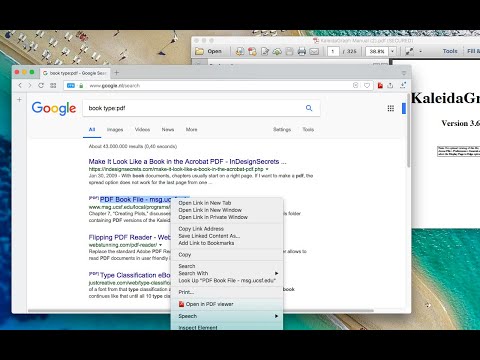
The "Open in PDF viewer" extension opens PDF files directly in your favorite external PDF viewer application. To use the extension, right-click on a PDF link and select the "Open in PDF viewer" item. The extension downloads the PDF file in your default downloads directory and then executes the external command to open the downloaded file with the default PDF viewer (e.g. Adobe Acrobat Reader or FoxIt PDF reader). Note that to execute an OS-level command, you need to install a native client. Native client installation guide appears on the first usage. Features: 1. Open PDF files from right-click context menu 2. Transfer already opened PDF files to the external PDF viewer by pressing the browser's action button 3. Detect PDF links and open them with left-click 4. Open the external PDF viewer with a user-defined delay 5. Supports most common PDF viewers Change Logs: 0.1.1: It is now possible to define left-click open in default PDF reader from the options page. If this mode is enabled, the extension blocks the default action when a link with the PDF mime type is the target. 0.1.2: It is possible to ask the extension to send the PDF URL to the external executable. Make sure your PDF Reader can open remote URLs before enabling this option 0.1.9: You can now run the external executable with a delay. This helps your antivirus application to validate the PDF file before this extension opens it with the external PDF viewer.
3,5 из 550 оценок
Подробности
- Версия0.3.7
- Обновлено18 ноября 2025 г.
- Автор:rynu.smith
- Размер53.63KiB
- ЯзыкиEnglish
- Разработчик
Электронная почта
rynu.smith@gmail.com - Не продавецРазработчик не указал для себя статус продавца. Просим клиентов из Европейского союза обратить внимание, что на сделки между вами и этим разработчиком не распространяются законы о защите прав потребителей.
Конфиденциальность

Этот разработчик утверждает, что ваши данные:
- Не продаются третьим лицам, за исключением разрешенных вариантов использования
- Не используются и не передаются в целях, не связанных с работой основных функций продукта
- Не используются и не передаются для определения платежеспособности или в целях кредитования
Поддержка
Сообщить об ошибках в работе приложения, задать вопрос или поделиться идеями можно на сайте разработчика.