


Descripción general
Send PDF links directly to your favorite PDF viewer like Adobe Acrobat Reader
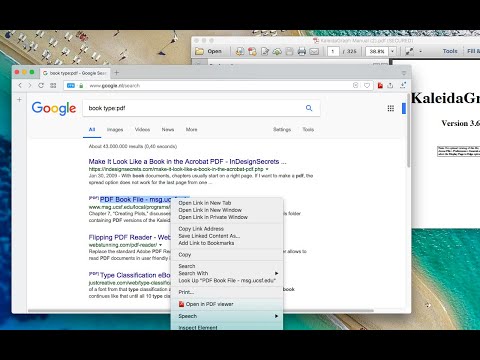
The "Open in PDF viewer" extension opens PDF files directly in your favorite external PDF viewer application. To use the extension, right-click on a PDF link and select the "Open in PDF viewer" item. The extension downloads the PDF file in your default downloads directory and then executes the external command to open the downloaded file with the default PDF viewer (e.g. Adobe Acrobat Reader or FoxIt PDF reader). Note that to execute an OS-level command, you need to install a native client. Native client installation guide appears on the first usage. Features: 1. Open PDF files from right-click context menu 2. Transfer already opened PDF files to the external PDF viewer by pressing the browser's action button 3. Detect PDF links and open them with left-click 4. Open the external PDF viewer with a user-defined delay 5. Supports most common PDF viewers Change Logs: 0.1.1: It is now possible to define left-click open in default PDF reader from the options page. If this mode is enabled, the extension blocks the default action when a link with the PDF mime type is the target. 0.1.2: It is possible to ask the extension to send the PDF URL to the external executable. Make sure your PDF Reader can open remote URLs before enabling this option 0.1.9: You can now run the external executable with a delay. This helps your antivirus application to validate the PDF file before this extension opens it with the external PDF viewer.
3,5 de 550 valoraciones
Detalles
- Versión0.3.7
- Actualizado18 de noviembre de 2025
- Ofrecido porrynu.smith
- Tamaño53.63KiB
- IdiomasEnglish
- Desarrollador
Correo electrónico
rynu.smith@gmail.com - No operadorEste desarrollador no se ha identificado como operador. Los consumidores residentes en la Unión Europea deben tener en cuenta que los derechos de los consumidores no son aplicables a los contratos que suscriban con este desarrollador.
Privacidad

Este desarrollador declara que tus datos:
- No se venden a terceros, excepto en los casos de uso aprobados
- No se usan ni se transfieren para fines no relacionados con la función principal del elemento.
- No se usan ni se transfieren para determinar la situación crediticia ni para ofrecer préstamos.
Ayuda
Si tienes alguna pregunta, sugerencia o problema, visita el sitio de asistencia del desarrollador.