

Open in MS Edge™
평점 40개
)

개요
Send the current page's link or all open tabs to the Microsoft Edge browser, or set optional rules for opening with a left-click.
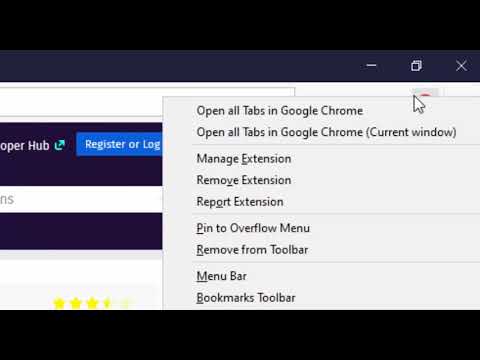
You can send HTML links to Microsoft's Edge browser with a single click. The extension includes a browser action button that, when activated, sends the URL from the active tab to the Edge browser. Optionally, you can instruct the extension to close the tab once the URL transfer is complete. It's important to note that, like similar extensions, this one requires a native component (macOS, Windows, and Linux) for communication with the external browser. Additionally, the extension enhances your productivity by adding a context menu option for links, allowing you to send them to the Edge browser with a simple right-click. To configure the extension to your needs, head to the options page and specify which hostnames should open in the Edge browser. Since the extension use a native component, it can initiate a new instance if it detects no open Edge windows. This component has a built-in tool to help you locate the Edge executable. The extension provides several context menu items within the browser action button, enabling you to send all tabs within the current window or across all windows to the Edge browser. Also, it has two context menu items for link and text selection. It will extract links from selection area and open links in the Edge browser. --- Legal Disclaimer Please be aware that 'Edge' is a registered trademark of Microsoft Inc. in the United States and other countries. This extension is an independent project and is not affiliated with the Edge team or Microsoft Inc. in any way.
5점 만점에 3.9점평점 40개
세부정보
- 버전0.3.4
- 업데이트됨2024년 12월 15일
- 제공rynu.smith
- 크기223KiB
- 언어언어 11개
- 개발자
이메일
rynu.smith@gmail.com - 비판매자판매자로 식별되지 않은 개발자입니다. 유럽 연합에 거주하는 소비자의 경우, 이 개발자와 체결한 계약에 대해서는 소비자 권리가 적용되지 않을 수 있음을 유의해야 합니다.
개인정보 보호

개발자가 사용자 데이터에 관해 다음과 같이 선언했습니다
- 승인된 사용 사례를 제외하고 서드 파티에 판매하지 않음
- 항목의 핵심 기능과 관련 없는 목적으로 사용하거나 전송하지 않음
- 신용도 판단 또는 대출 목적으로 사용하거나 전송하지 않음
지원
질문, 제안 또는 문제와 관련하여 도움이 필요하시면 개발자의 지원 사이트를 방문하세요.